How to Start a Shopify Dropshipping Store (2026 Guide)
Start a Shopify dropshipping store in 2026: plan prices, supplier apps, a pricing formula, store setup steps and a test-order checklist before you spend on ads.

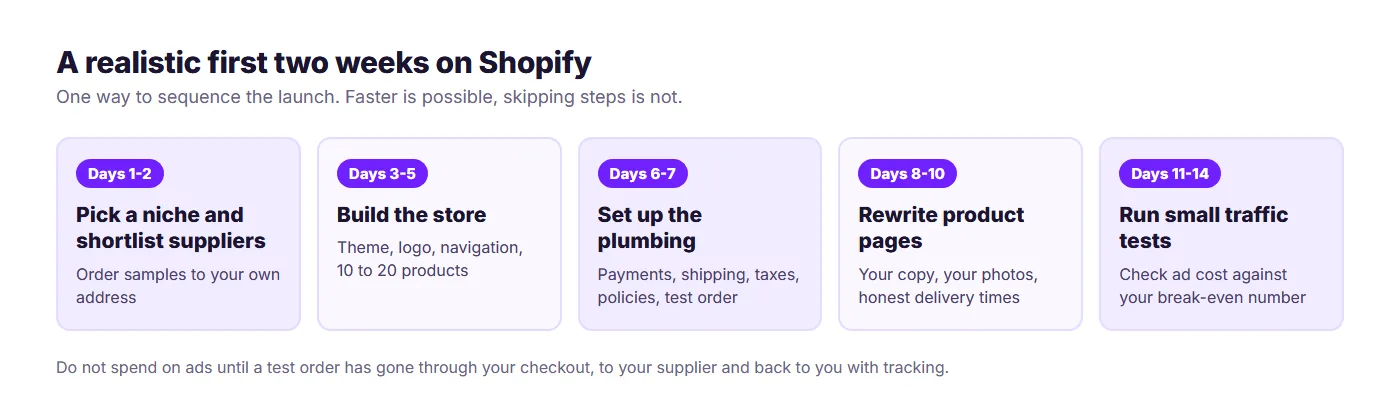
To start a Shopify dropshipping store, you sign up for a Shopify plan, pick a niche, connect a supplier app that imports products and forwards orders, set up payments, shipping, tax and policies, and run a test order before you spend a cent on ads. A focused beginner can have a store ready to take real orders in one to two weeks. The part that takes longer is getting the first sales, and that depends on picking products with enough margin to pay for traffic.
This guide walks through the full setup in order, with the actual Shopify admin menus, the current plan prices, a pricing formula you can copy, and the checks that stop a first order going wrong. It's written for 2026, so it also covers the changes that matter now: cheaper trial pricing, AI store builders, and why more new stores pick faster US and EU suppliers over the slowest overseas ones.
What you need before you open a Shopify account
You can start with very little, but a few decisions are worth making first because they're annoying to undo later:
- A rough niche. "Home office accessories" is a niche. "Everything trending" isn't.
- A business name you can get as a domain. Check the .com before you fall in love with a name.
- A payment method for the store plan, ads and sample orders. A credit card makes everything smoother.
- A country to sell to first. Your tax, shipping and supplier choices all depend on it. Pick one main market, then expand.
- A plan for the first 90 days. Dropshipping rarely pays out in month one, so set a small budget you can afford to lose.
How much does a Shopify dropshipping store cost?
Shopify's current pricing page (checked October 2026) lists three main plans on annual billing, and a trial offer that cuts the first months to almost nothing. Here's what matters for a dropshipper.
| Plan | Price (annual billing) | Online card rate | Third-party gateway fee |
|---|---|---|---|
| Basic | $29/month | 2.9% + 30c | 2% |
| Grow | $89/month | 2.7% + 30c | 1% |
| Advanced | $359/month | 2.5% + 30c | 0.6% |
Shopify advertises a 3-day free trial, then $1/month for the first three months on most plans, so your first quarter on the store itself costs very little. After that you pay the standard rate. Check the Shopify pricing page for the current offer in your country, since prices and trials can differ by region.
Start on Basic. Moving up only pays for itself at volume. Grow costs $60 a month more than Basic and saves 0.2% on card fees, so the fee saving alone doesn't cover the difference until you're processing about $30,000 a month through Shopify Payments. Advanced costs $270 more than Grow for another 0.2% saving, which needs roughly $135,000 a month to break even. Upgrade for features you need, not because of fee percentages at beginner volumes.
On top of the plan, budget for a dropshipping app or supplier subscription (Spocket plans start at $39.99/month with a 7-day trial), a domain, sample orders, and ad spend.
Step 1: Pick a niche and validate the margin
A good first niche has three things: products you can sell for $25 or more, a clear audience, and a visible gap between what suppliers charge and what stores sell for. Cheap impulse items under $15 rarely survive ad costs.
Validate before you build. Search the products on Google and TikTok, look at who's selling them and at what price, and check whether the same item is on Amazon at a lower price. If it is, your price ceiling is lower than you think. For research methods, see best dropshipping niches.
Step 2: Choose a supplier and order samples
Your supplier decides delivery time, product quality and a big share of your margin, so choose before you build the store. You'll normally connect one through an app from the Shopify App Store. Shopify's own dropshipping category lists dozens, including DSers (AliExpress), Syncee and Spocket.
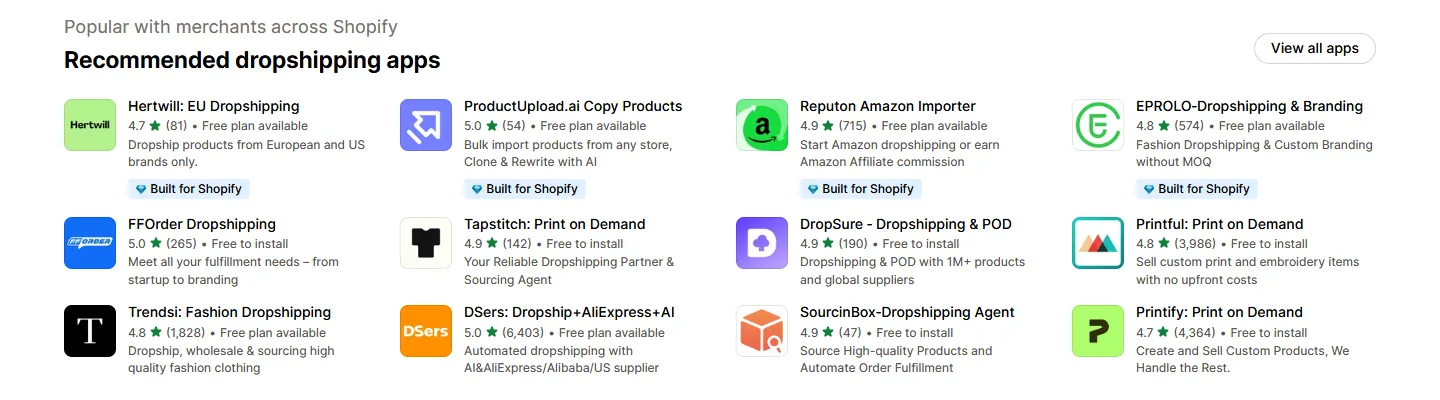
Compare suppliers on four points:
- Shipping origin and speed. Where does the parcel actually ship from? A store selling to US customers is better off with US or EU suppliers than with a three-week overseas wait.
- Branding options. Can the supplier use your name on the invoice and keep their prices off the packing slip?
- Stock reliability. What happens when an item sells out after a customer has paid you?
- Cost to you. Wholesale price, shipping, and any monthly app fee.
Order a sample of your first two or three products to your own address. You'll learn the real delivery time, the packaging quality and what your customer will think. This is the cheapest insurance in the whole process. If you want to look at Spocket, it connects through the Shopify integration, and the 7-day trial lets you browse US and EU suppliers before you decide. For a wider comparison, read dropshipping suppliers for Shopify.
Step 3: Create your Shopify store
Go to Shopify, start the trial and enter your store name. Shopify will ask a few questions about what you plan to sell, and you can skip most of them. Then work through the admin in this order:
- Settings, then Plan. Confirm you're on the plan you intend to pay for after the trial.
- Settings, then Store details. Add your legal business name, address and store currency. Changing the store currency later is awkward, so decide now.
- Online Store, then Preferences. Your store starts with password protection while you build. Leave it on until the test order is done.
Shopify and several third-party tools now offer AI-assisted setup that drafts a theme, pages and sample products from a short description. It's a fast way to get a first draft, but treat it as a starting point and rewrite the copy yourself. If you want to compare builders, see AI store builders.
Step 4: Choose a theme and set up the basics
You don't need a paid theme. Shopify's Theme Store lists free themes (24 when we checked in October 2026), and the free ones are built for conversion and mobile first. Pick one that suits your product style, with a clean product page and a simple header.
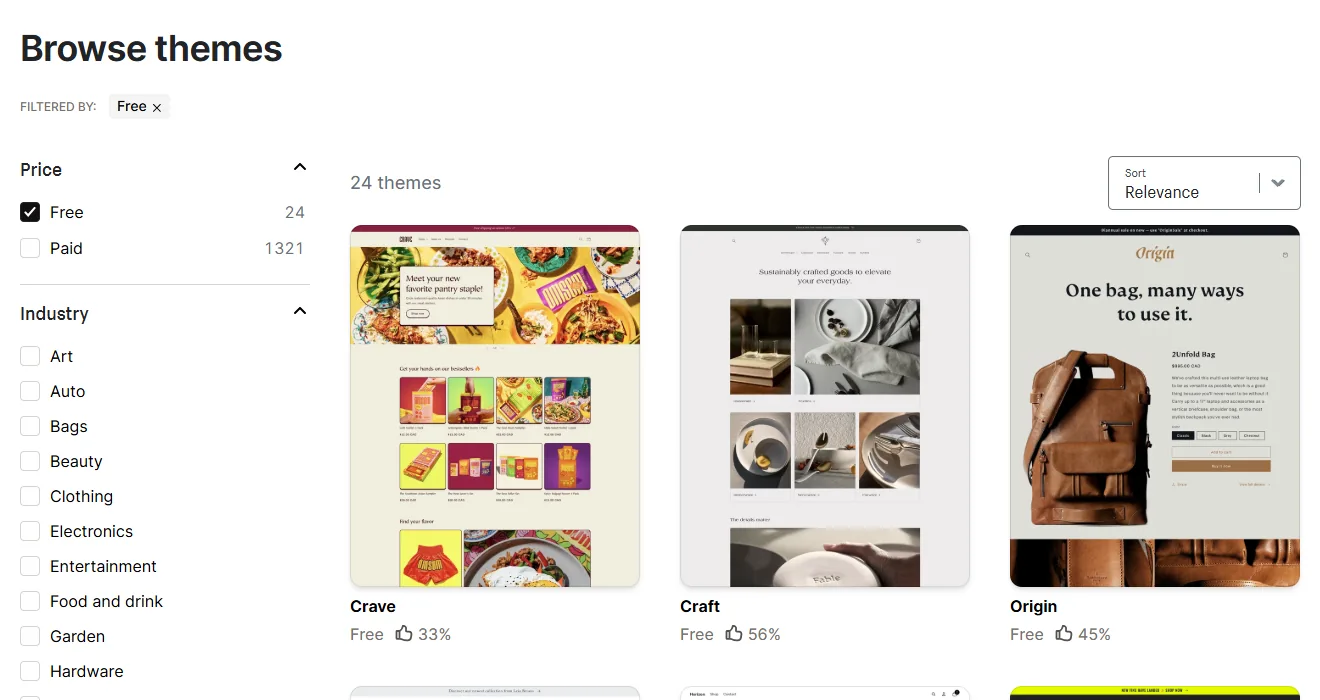
In Online Store, then Themes, add a free theme and click Customize. Set up:
- Logo and colours. Two brand colours and one font is plenty.
- Menus. Keep it to five or six links: Shop, a couple of collections, About, Contact, Shipping and returns.
- Homepage. One clear banner, a featured collection, a short trust section (delivery, returns, support), and email signup.
- Mobile check. Most dropshipping traffic comes from phones, so preview on mobile before desktop.
Step 5: Import products and rewrite the product pages
Open your supplier app inside Shopify and import your first 10 to 20 products. More isn't better at this stage. A focused catalogue converts better and is easier to manage.
Then rewrite every product page. Supplier descriptions are copied across hundreds of stores, which weakens your Google ranking and makes your shop look generic. For each product:
- Write a short benefit-led description in your own words, then specs in a bullet list.
- Use your own photos from the sample order where you can, plus the supplier's best images.
- State the delivery window honestly. If the supplier ships in 2 to 7 days, don't promise next-day.
- Add size, material and care details that answer the questions you'd ask as a buyer.
Our dropshipping product page checklist covers what a strong page needs.
Step 6: Price your products so they can pay for ads
Don't price off the supplier's suggested retail price. Price from your costs. This formula works for a store taking card payments at 2.9% + $0.30:
Price = (product cost + shipping + target profit + ad allowance + $0.30) / 0.971
Say a product costs $14 plus $5 shipping from the supplier. You want $8 profit and can spend $10 on ads per order. That's ($19 + $8 + $10 + $0.30) / 0.971 = $38.42, so you'd list it at $38.99. Check: the card fee is $1.43, the supplier takes $19, and you're left with $18.56, which is your $8.56 profit plus the $10 ad allowance.
If the number looks too high for the market, you have three choices: find a cheaper supplier, bundle products to lift the order value, or drop the product. Don't cut your ad allowance to zero and hope for organic sales. To test your own numbers, use the profit margin calculator.
Step 7: Set up payments, shipping and taxes
- Payments. In Settings, then Payments, activate Shopify Payments if it's available in your country, and add PayPal as a second option. Using a third-party gateway instead of Shopify Payments adds the transaction fee shown in the table above.
- Shipping. In Settings, then Shipping and delivery, create shipping profiles. Many stores use flat-rate shipping, or free shipping above a threshold with the cost built into the product price. The Shopify shipping profiles guide explains how to set rates per supplier.
- Taxes and duties. In Settings, then Taxes and duties, tell Shopify where you collect tax. The rules differ by country and state, so read Shopify's tax help and dropshipping taxes before you launch.
Step 8: Add legal pages and a business registration
Your store needs a refund policy, privacy policy, terms of service and shipping policy. In Settings, then Policies, Shopify can generate templates for each. Edit them so they describe what you actually do. A refund policy that says "30-day returns" while your supplier only takes 14 days will cost you money. See Shopify's legal pages guide and write the return terms to match your supplier's.
Also check what your location requires: a business registration, a sales tax permit, or both. Rules vary, and a local small business office can confirm what applies. Do this before your first order, not after.
Step 9: Run a test order before you launch
This is the step most guides skip, and it prevents most of the first-week disasters. Place a real order through your own store and follow it end to end:
- Turn on test mode for your payment provider (Shopify documents test card numbers for testing Shopify Payments) to check the checkout, emails and tax calculation.
- Then place one real, small order for a sample product to your own address, with live payments, so the order flows through to the supplier.
- Check that the supplier received it, the tracking number reached your customer email, and the packing slip looks right.
Only after that should you remove the password under Online Store, then Preferences, and connect a domain (Settings, then Domains). The Shopify domains guide shows how.
Step 10: Get your first traffic
A live store with no traffic makes no sales. Pick one or two channels and test them properly, instead of spreading a small budget across five.
- Short-form video. TikTok and Reels cost time rather than money and suit visual products.
- Paid social. Meta and TikTok ads give the fastest feedback. Start with a small daily budget and judge results against your break-even number from Step 6.
- Google Shopping and search. Better for products people already search for by name.
- Email. Collect addresses from day one and set up abandoned cart emails. Abandoned cart emails win back a share of lost checkouts.
Our guide to dropshipping ads best practices picks up where this post ends.
What running the store looks like once it's live
After launch the work shrinks into a routine. When a customer pays, Shopify creates the order in your admin under Orders. Your supplier app picks it up and sends it on, either automatically or after you approve it. The supplier packs and ships, the tracking number syncs back to the order, and Shopify emails the customer. Your job is to catch the exceptions.
A ten-minute daily check covers most of it:
- Orders waiting to be sent. Anything stuck in "unfulfilled" for more than a day needs a look.
- Supplier messages. Out-of-stock notices and price changes arrive here first, and a price rise can wipe out a margin you worked out last month.
- Tracking that hasn't moved. Parcels with no scan after several days are the ones that turn into angry emails.
- Customer inbox. Reply the same day. Most "where is my order" emails are fixed with one honest message.
- Ad spend against orders. Compare yesterday's spend to yesterday's profit per order from Step 6.
Once you have a few weeks of data, drop the products that don't sell, raise prices on the ones that do, and add related items to lift order value. That's how a 15-product test store turns into a real catalogue.
Mistakes that sink new Shopify dropshipping stores
- Launching with 200 products. You can't test or support that many. Start with 10 to 20.
- Skipping the test order. Then the first real customer finds the broken checkout.
- Copying supplier descriptions. They're the same on every competing store.
- Ignoring margins until ads are running. Do the pricing math first.
- Promising delivery you can't meet. Honest windows beat refund requests.
- Judging a product after one day of ads. One day is noise, so give each test a fair budget and time before you cut it.
Is a Shopify dropshipping store worth starting in 2026?
It's worth it if you treat the store as a real business: a defined niche, suppliers you've tested, margins you've worked out, and a small test budget. The upfront cost is low, with Shopify's trial pricing making the platform itself cheap for the first quarter. The hard part is marketing, and you only find out how hard by trying.
When you're ready to find products, start the Spocket 7-day trial and browse trending products from US and EU suppliers.
Start your dropshipping business today
Try Spocket Free!
Shopify Dropshipping Store FAQs
How much does it cost to start a Shopify dropshipping store?
The store itself is cheap: Shopify Basic is listed at $29/month on annual billing, and Shopify advertises a 3-day trial then $1/month for the first three months on most plans. Add a supplier app, a domain, sample orders and an ad budget. Advertising is the big variable, and most beginners set aside a few hundred dollars to test.
Can I dropship on Shopify with no money?
You can build a store and import products for very little during the trial, but "no money" isn't realistic. Traffic costs either time or ad spend, sample orders cost real money, and the plan fee starts after the trial. Treat it as a low-cost test rather than a free one, and only spend what you can afford to lose.
Which Shopify plan is best for dropshipping?
Basic is the right plan for almost every beginner. The higher plans mainly cut card fees by small percentages, so they only pay for themselves at high volume: roughly $30,000 a month in card sales to justify Grow over Basic. Upgrade when you need specific features or your sales volume makes the fee saving worth it.
Do I need a business license to dropship on Shopify?
It depends on your country, state and city. Many sellers start as sole proprietors, but some places require a business registration, a sales tax permit or both before you take orders. Shopify doesn't decide this for you. Check with your local small business office, and set up tax collection in Shopify before your first sale.
How long does it take to set up a dropshipping store on Shopify?
A focused beginner can finish the build in a few days and be ready for real orders in one to two weeks, including sample orders, policies and a test purchase. Picking products and getting traffic takes longer. Rushing the setup tends to cause problems later, such as wrong shipping rates, missing policies or a checkout that doesn't pass orders to the supplier.
What are the best dropshipping apps for Shopify?
It depends on what you sell and where. Shopify's app store lists many, including DSers for AliExpress products, Syncee, and Spocket for US and EU suppliers with shipping typically in 2 to 7 days. Compare shipping origin, branding options, stock reliability and monthly cost, and order a sample from each supplier before you commit.
Is Shopify dropshipping still profitable in 2026?
It can be, but margins are tight. Printful reports most dropshipping stores net between 10% and 30%, with beginners usually under 15%. Stores that last choose products with room to pay for ads, use reliable suppliers, and price from their own costs. Plan for slow early months rather than quick money.


Launch your dropshipping business now!
Start free trial


Related blogs
Dropshipping Supplier Directory: Where to Find Vetted Suppliers
Browse our directory of vetted dropshipping suppliers across the US and EU, complete with niches, shipping speed, and pricing. Start your free trial today.

How to Negotiate With Dropshipping Suppliers: 9 Tactics That Actually Work
Learn how to negotiate with dropshipping suppliers on price, MOQs, and payment terms. Proven tactics and email scripts to boost your margins. Try Spocket free.

Is AliExpress Legit? A Safety Check for Buyers and Dropshippers
Is AliExpress legit? Yes, but sellers vary. See how Buyer Protection works, what the EU's 2026 fine means, customs costs, and whether it's safe for dropshipping.