


Outsourcing Customer Service: When and How to Hire a VA?
Your to-do list never shrinks. If this sounds like you, get outsource customer service support. Here is how to hire a VA and get your time back.


You’re busy. You’re putting out fires, answering the same questions over and over, and barely keeping up with emails. If you notice your response times slipping or your team getting overwhelmed, you’ve got a problem. But you can fix it. Outsourcing customer service isn't just for big corporations anymore. It’s how smart small businesses scale up without losing their minds. You get to hand off the repetitive stuff to pros who actually like dealing with it. This frees you up to focus on what you’re good at. So, when should you do it? Pretty much as soon as you realize your time is better spent elsewhere. Here’s how to hire a VA and actually make it work.
What is a VA?

A Virtual Assistant (VA) is a remote professional who handles tasks for you from their own office, home, or favorite coffee shop. They are not employees in the traditional sense. You don’t provide them with a desk or a computer. You provide them with tasks, and they get them done. They use the internet, phone, and various software to keep your business running smoothly while you sleep or focus on the big picture.
Benefits of Hiring a VA and Outsourcing Customer Service
You get your time back. That’s the main thing. But there’s more to it than just clearing your schedule.
Cost Efficiency That Actually Makes Sense
Hiring a full-time employee is expensive. You’re looking at taxes, benefits, paid time off, and the cost of office space. If you hire a virtual assistant, you avoid almost all of that. You pay for the work done or the hours worked. You can hire virtual assistant cheap options from global markets or invest in a higher-skilled pro. Either way, you save on overhead. That money goes back into growing your business .
Access to a Wide Talent Pool
You aren't limited to hiring someone who lives within driving distance. You can hire VA online from anywhere in the world. Need someone who speaks Spanish for your Latin American clients? Done. Need a tech wizard in Eastern Europe? You can find them. You get to pick from a global talent pool, not just the people willing to commute to your office .
Scalability and Flexibility
Business gets busy? You can scale up your VA’s hours. Things slow down? Scale them back. You don't have to go through the awkward process of layoffs or feel guilty about not giving someone enough hours. A VA arrangement bends to your business needs, not the other way around. It’s support that adjusts as you grow .
When to Hire a VA?
You do not need a virtual assistant on day one. But waiting too long costs you money and slows your growth. Here is how you know when the time is right.
You Spend More Time on Admin Than Revenue
If you start your day answering emails, processing invoices, and scheduling posts, you are not working on your business. For real estate professionals, working with virtual real estate assistants can help handle these repetitive tasks, allowing you to focus on closing deals and growing your business. You are working in it. That feels busy, but it does not move the needle. When admin eats up more than a few hours weekly, you lose money. You can hire a VA to handle those tasks for a fraction of your hourly rate. They take over the paperwork. You get back to selling, building, or creating.
Your Response Times Keep Sliding
Customers expect fast replies. If you notice emails sitting for 24 hours or chat requests timing out, you have a problem. Slow responses lose sales and annoy people. A VA can monitor your inbox, answer common questions, and escalate urgent issues to you. They keep response times low while you sleep or focus on deep work. If your support backlog keeps growing, hire someone to clear it.
You Delay Projects Due to Lack of Time
You have ideas. A new product line. A marketing campaign. A website refresh. But you never start because you are stuck putting out fires. That is a clear sign you need help. A VA takes over the daily grind so you can actually work on things that grow your business. If your to-do list contains items that have sat there for months, outsource the tasks blocking them.
You Cannot Afford a Full-Time Employee
Hiring a full-time staff member costs more than salary. You pay payroll taxes, benefits, equipment, and training. If your budget does not support that, a VA bridges the gap. You pay for 10 or 20 hours weekly without the overhead. You get professional help without the commitment of a permanent hire. If you need support but cannot justify another employee yet, outsourcing customer service to a VA solves the problem.
How to Hire a VA?
Hiring isn't rocket science, but you can't just wing it either. You need a plan.
- Define the Role Clearly: Sit down and write out exactly what you need. Do you need someone for email management, customer service chat support, or social media? If you don’t know what you want, they won’t know what to do. Be specific about the tasks and the skills required.
- Choose Your Hiring Model: Decide if you want a freelancer, an agency, or a direct hire. Freelancers are great for one-off projects. Agencies handle the vetting for you, which saves time. Direct hires from platforms like OnlineJobs.ph give you more control but require you to do the screening .
- Look for Relevant Experience: Check their resume and portfolio. If you need help with e-commerce, find someone who has done e-commerce customer service outsourcing before. Ask about the specific platforms they’ve used, like Shopify or Zendesk. Experience matters.
- Conduct a Skills Test: Don't just take their word for it. Give them a small, paid test project. Have them draft an email response to a tricky customer query. This shows you their writing skills and how they handle pressure. It’s the best way to see if they’re the real deal.
- Check References or Reviews: If you're hiring through a freelance platform, read the reviews. If you're hiring independently, ask for references. A quick call with a past client can tell you more than ten interviews. You want to know if they show up on time and do good work.
- Interview for Soft Skills: You need someone who communicates well. Since you’ll be working remotely, clear communication is everything. Make sure they speak your language fluently (if that’s a requirement) and seem like someone you can actually work with day in and day out.
- Start with a Trial Period: Agree on a probation period, like 30 days. This gives you an out if it’s not working. It also gives them a chance to prove themselves. If they crush it, you keep them. If not, you part ways without any hard feelings .
Where to Hire a VA?
You can find VAs all over the internet. You just need to know where to look for different types of help.
- Freelance Platforms: These are marketplaces for quick hires. You post a job, and people bid on it. Great for short-term projects or if you want to try someone out without a huge commitment. Upwork takes a cut, but it offers some protection for both sides .
- Dedicated VA Websites: There are platforms specifically designed for hiring VAs, around the world. They are popular places to find administrative and customer service talent. You deal directly with the candidates, so you need to be prepared to vet them yourself.
- HR consulting firms: Some businesses turn to HR consulting firms for more strategic hiring support. These firms can help source, vet, and onboard virtual assistants while ensuring compliance with employment practices and aligning hires with your long-term business goals.
- Specialized VA Agencies: Agencies do the heavy lifting for you. They recruit, screen, and test candidates so you only interview the top ones. It costs a bit more, but it saves you dozens of hours. They also handle HR issues and provide replacements if things don't work out .
- Professional VA Networks: You can post jobs on LinkedIn to attract experienced professionals. This is good if you need a higher-level VA with specific industry experience, like a freelance social media virtual assistants expert. You get access to a professional crowd.
- BPO Companies: If you need a whole team, look at Business Process Outsourcers. These companies provide full-service support. They handle hiring, training, and management. It’s more expensive than a single VA, but it’s professional and scalable .
- Niche Job Boards: There are job boards for everything. Look for boards that specialize in remote work or specific industries. You can find top customer service outsourcing companies advertising there, or you can post your own ad looking for pre-vetted VAs for business.
6 Best Apps and Platforms for Hiring VAs and Outsourcing Customer Service Support
Here are the tools and platforms you should look at in 2026 if you’re ready to outsource.
1. Upwork

Upwork is still one of the biggest freelance marketplaces out there. You can find pretty much anyone here, from graphic designers to customer support reps. If you need to hire someone for a specific project or a few hours a week, this is a solid place to start. You post the job, set your budget, and proposals roll in. The platform handles payments and offers dispute support, which gives you some peace of mind . You can even find people offering virtual assistant jobs for beginners if you're willing to train someone up.
Key Features
- Secure Payment Protection: Upwork tracks hours worked and milestones met. You only pay for work you approve. This keeps freelancers honest and protects your money.
- Vast Talent Pool: Millions of freelancers are on the platform. You can search by skills, location, and hourly rate. If you need outsourcing customer service email specialists, you can filter for exactly that.
- Communication Tools: They offer built-in messaging and video call tools. You don't need to exchange personal emails or phone numbers until you're ready.
- Work Diary: For hourly contracts, you get a live look at what the freelancer is working on. It takes screenshots and logs keystrokes. You see the work happening in real time.
- Talent Marketplace: You can browse profiles or post a job and let candidates come to you. It’s flexible and puts the power in your hands .
2. Fiverr

Fiverr works a bit differently. Instead of hiring someone and managing their time, you buy "gigs." Freelancers list specific services at set prices. If you need a social media graphic made or a script written, you find the gig and pay for it. It’s fast and transactional. This is great for one-off tasks where you know exactly what you want. If you need a Fiverr virtual assistant, you just search for the service category and browse the offerings.
Key Features
- Categorized Services: Everything is organized by category. You can easily find top social media virtual assistants or customer service pros without sorting through irrelevant profiles.
- Fixed Pricing: You see the price upfront. No bidding, no negotiating. You pay for the gig, and the work gets done. It’s simple and predictable.
- Seller Levels: Freelancers are ranked by performance. Level One, Level Two, Top Rated Seller. These badges help you identify reliable, experienced pros quickly.
- Custom Offers: You can message a seller and ask for a custom quote if their listed gigs don't exactly match your needs. They’ll send you an offer tailored to your project.
- Fast Turnaround: Most gigs are designed for quick delivery. If you need something done in 24 hours, you can filter for sellers who offer that.
3. FreeUp

FreeUp focuses on quality over quantity. They pre-vet their freelancers so you don't have to. Only the top 1% of applicants make it into their network . You tell them what you need, and they match you with pre-screened candidates. This saves you from sifting through hundreds of applications. It’s ideal for busy owners who just want to hire someone and get to work without the recruitment headache .
Key Features
- Pre-Vetted Freelancers: Every freelancer is interviewed and tested before they join. You don't have to worry about scammers or unqualified people wasting your time.
- No-Risk Hiring: If you aren’t happy with the freelancer, FreeUp helps you find a replacement quickly. You aren't stuck with a bad hire.
- Multiple Categories: They cover e-commerce, digital marketing, web development, and customer service. You can find specialized help for almost any business need.
- Fast Matching Process: You submit a request, and they send you qualified candidates within hours. It’s designed for speed and efficiency.
- US-Based Support: Their team is based in the US. If you have issues, you talk to real people who understand your business context.
4. Thumbtack
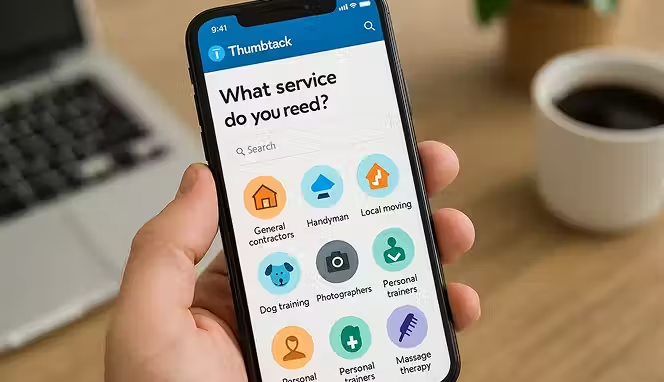
Thumbtack is usually known for local services like plumbers and photographers. But it has evolved. You can now find freelancers for digital and administrative tasks too. If you need help with event planning, quick graphic design, or even setting up a home office for your remote work, Thumbtack connects you with local pros who offer those services . It’s a hybrid model that gives you options.
Key Features
- Local Search: You can find professionals in your city. This is great if you eventually want to meet in person or need someone familiar with local regulations.
- Verified Reviews: Reviews are tied to actual projects booked through the platform. You know the feedback is real and not faked by friends.
- Instant Booking: Many pros offer instant booking. You find them, pick a time, and pay right on the platform. No back-and-forth emails.
- Cost Estimates: You can get price estimates for projects before you commit. It helps you budget and compare different freelancers.
- Business Profiles: Pros have detailed profiles showing their experience, licenses, and background checks. You get a full picture before you hire.
Start your dropshipping business today
5. TaskUs

TaskUs is not for hiring a single VA. It’s a company you hire to handle your customer service operations at scale. They are a major player in the customer support outsourcing companies in USA market . If your business is growing fast and you need a whole team to manage customer queries, they build it for you. They combine AI and human agents to handle everything from chat support to trust and safety issues. This is for serious outsourcing, not light delegation.
Key Features
- Digital CX Services: They specialize in digital customer experience. This includes chat, email, and social media support. They don't just do phone calls.
- Trust & Safety: They have specialized teams that handle content moderation and user safety. If your platform needs 24/7 monitoring, they do that.
- AI Services: They use AI to augment their human teams. This means faster response times and better data collection for your business .
- Rapid Scaling: They can ramp up a team for you in weeks, not months. If you have a sudden surge in demand, they handle it.
- Global Locations: They have teams all over the world. You can provide support in multiple languages without hiring internationally yourself.
6. Helpware

Helpware is another BPO provider that focuses on tech-driven customer experiences. They act as an extension of your own company. You get dedicated teams that learn your brand and your products inside out. They serve a lot of different sectors, from e-commerce to healthcare . If you want to outsource but you’re worried about losing your brand voice, Helpware focuses on keeping things consistent.
Key Features
- Dedicated Teams: You don't share your support agents with other companies. You get a team that works only on your account. This builds expertise and loyalty.
- Tech Integration: They integrate with your existing tools. You keep using your CRM and helpdesk software. They just plug into it.
- Multi-Channel Support: They handle calls, emails, chat, and social media. Your customers can reach you however they want.
- Specialized Services: They offer specific solutions for different industries, including HealthTech and Fintech. They understand the unique rules of those markets.
- Global Presence: They have locations in 10 countries. You can offer 24/7 support by using teams in different time zones.
7. RemoFirst
Upwork and Fiverr are great for finding a VA. But what happens when that VA turns out to be your best hire and you want to bring them on full-time?
If they're in another country, you hit a wall fast. You cannot just put an international contractor on the payroll without first registering a legal entity in their country. That's where RemoFirst comes in.
RemoFirst is an AI-native global Employer of Record (EOR) platform. It becomes the legal employer on paper in whichever country your hire is based, so you don't have to. From employment contracts and local payroll to statutory benefits and tax compliance, RemoFirst handles it all. You get the employee. They handle the paperwork.
It operates in 185+ countries and supports both full-time employees (starting at $199/month per full-time hire) and international contractors ($25/month per contractor). If you're serious about building a committed remote team rather than cycling through freelancers indefinitely, this is how you do it without the legal trouble.
Key Features
- Global EOR coverage: Employer of Record services in 185+ countries. Hire full-time employees anywhere without opening a local entity.
- Compliant payroll: Processes local payroll and tax filings in each country of hire, consolidated into a single invoice.
- Contractor management: Manages international contractors separately from full-time employees, with locally compliant contracts.
- Benefits administration: Provides statutory benefits through Remo Health, customized to local requirements.
- Visa and work permit support in 110+ countries: Handles applications and paperwork for international hires.
- Background checks: Pre-employment verification before onboarding.
Conclusion
Outsourcing customer service works when you pick the right person and the right platform. You save money, you get your time back, and your customers get faster answers. Start with one task. Hand off email support or chat responses. See how it feels. If it works, hand off more. You do not need to build a huge in-house team to deliver good service. You just need one good VA to start. Read this to learn how to become a virtual assistant.
Hire VA Online FAQs
How much does it cost to outsource customer service for a small business?
You can pay anywhere from $5 to $50 an hour depending on where you hire. If you hire virtual assistant cheap from regions with lower costs of living, you might pay $5 to $15 hourly. If you hire through top customer service outsourcing companies in the US, rates can go much higher. You also have to consider if you pay per hour, per project, or a monthly retainer to an agency .
What is the average virtual assistant salary in 2026?
For US-based VAs, the average hourly rate is around $19.51. This varies based on skills. Someone with Microsoft Office skills might be on the lower end. A specialized VA with technical or marketing skills can command $30 an hour or more. If you hire globally, you can find skilled VAs for much less, sometimes as low as $4 to $10 an hour, depending on the country .
How do I hire a virtual assistant in the USA specifically?
You can hire VA online through platforms like Upwork or LinkedIn. If you specifically want a US-based VA, use the location filters on these sites. You can also look at top 10 virtual assistant companies that operate in the US. Agencies like Belay or Time etc specialize in connecting you with US-based assistants. Be prepared to pay higher rates for US-based talent compared to global hires.
What is the best platform to hire freelance social media virtual assistants?
Fiverr and Upwork are great for this. On Fiverr, you can search specifically for "social media managers" and see their gig packages. You'll know upfront what you get for the price. Upwork lets you post a detailed job description and review proposals from freelancers around the world. Look at their portfolios and past work to see if their style matches your brand before you hire them.


Launch your dropshipping business now!
Start free trial.avif)


Related blogs
How to Open a Business Bank Account for Your Dropshipping Store
Set up your dropshipping finances the right way with a dedicated business bank account built for payouts, supplier payments, taxes, and long-term store growth.

Spocket vs Dropified: Which Tool Is Better for Multi-Store Scaling?
Compare Spocket and Dropified for multi-store dropshipping, supplier quality, automation, fulfillment, product sourcing, and scaling across ecommerce platforms.
Social Commerce in 2026: How Dropshippers Are Selling Directly Inside Social Apps
See how dropshippers are using TikTok Shop, Instagram, Facebook, Pinterest, creators, and shoppable content to sell products inside social apps.
