


How to Sell Notion Templates: The 2026 Step-by-Step Guide
Want to turn your Notion templates into income? Learn how to sell Notion templates with our complete guide covering creation, pricing, marketing, and top platforms.

You spend hours building the perfect Notion workspace. Your task system flows. Your content calendar actually works. Your habit tracker keeps you on track. Friends ask for copies. Then you realize something: people will pay for this.
Selling Notion templates has become one of the most accessible online businesses. You build once. You sell forever. There is no inventory. No shipping. No customer support beyond basic questions. And the market keeps growing with millions of Notion users worldwide.
This guide shows you exactly how to sell Notion templates in 2026. You will learn how to create templates people want, where to list them, how to price them, and how to market them. Whether you are a beginner or have built systems for years, these steps will help you turn your knowledge into income.
Why Selling Notion Templates Works?
Notion has exploded past 50 million users. Each new user needs organization. They need systems for work, school, and life. They do not want to build from scratch. They want ready-made solutions they can duplicate and use immediately.
Creators are earning real money. Some have made over $1 million from templates . Others earn $500 to $10,000 monthly. One Reddit user shared making $3,000 in their first month, with most sales coming while they slept from customers in different time zones. Another creator, Easlo, has made over $500,000 selling templates.
The barrier to entry is almost zero. You need a free Notion account and knowledge of how to build useful systems . You do not need coding skills, design degrees, or upfront capital. You just need to solve problems for people.
What Makes a Notion Template Sellable?
Not every template sells. The ones that do share common traits. Understanding these saves you time building products nobody wants.
Solve Real Problems
The best templates fix specific frustrations. Browse Reddit communities like r/Notion and r/productivity. Look for questions people ask repeatedly. One creator found their best idea by watching the same question pop up each week. Your templates should answer those questions.
Target Specific Niches
Productivity templates face heavy competition. Niche topics work better. Think academic research trackers for PhD students. Wedding planning dashboards for engaged couples. Meal prep calendars for fitness enthusiasts. Small business financial trackers for freelancers. These audiences face less competition and will pay more for specialized solutions.
Prioritize User Experience
Your template should work immediately. Users should understand it within minutes. Break content into toggle lists and headings. Use consistent colors and fonts. Add clear instructions through call-outs or placeholder text . If users get confused, they will not recommend your template to others.
Allow Customization
People want templates they can make their own. Build your system to work out of the box, but let users change colors, categories, and layouts. Include a "Template Guide" section they can delete after setup . This flexibility increases satisfaction and reduces refund requests.
How to Create Your First Notion Template
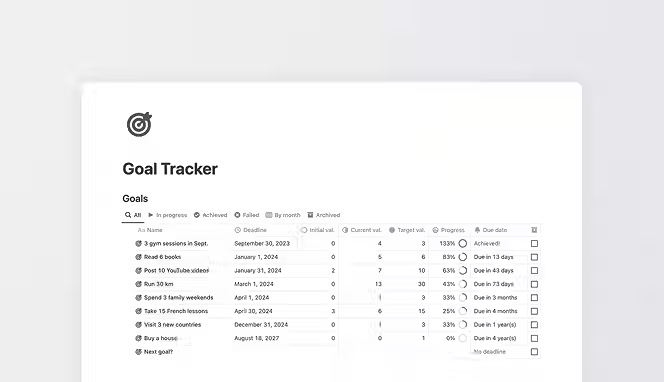
Creating a sellable template follows a process. Here is how you can make a Notion template.
Step 1: Build Your System
Start inside Notion. Create the pages, databases, and views your template needs. Make everything functional first. Test it yourself for a few weeks. Notice what feels awkward and fix it. Your personal use reveals improvements you would not catch otherwise.
Step 2: Add Visual Polish
Choose two to four complementary colors and apply them consistently. Limit fonts to one or two easy-to-read options. Add icons that enhance navigation without distracting. Your template should look professional enough that buyers feel confident using it.
Step 3: Create Documentation
Write simple instructions explaining how to duplicate and use your template. For complex systems, consider adding a short video walkthrough. Some successful creators include their templates inside PDF guides with tips for maximizing value . Good documentation reduces support questions and increases satisfaction.
Step 4: Set Correct Permissions
Before sharing, adjust your settings. Turn off "Allow Editing" and "Allow Comments." Turn on "Allow duplicates as templates." This protects your original while letting customers make their own copies.
Step 5: Duplicate as Template
Go to the page you want to template. Click the three dots in the top right. Select "Duplicate as template." Give it a name and category. Save it to your templates tab. Now you have a clean version ready for sale.
Where to Sell Notion Templates
You have two paths. Marketplaces bring built-in audiences. Your own store gives more control and higher margins. Most successful creators use both.
The Notion Marketplace
Notion launched its official Marketplace where creators can list and sell templates directly . You manage everything inside Notion. Payments process through the platform. Customers can leave ratings and reviews. You see analytics on visitors, duplications, and earnings.
To list, submit your template for review. Notion's team checks quality, design, originality, and compliance before approval . They look for well-designed work free of errors. They reject spam and low-quality submissions. Once approved, you gain exposure to millions of Notion users.
Third-Party Marketplaces
Several platforms specialize in Notion templates. Gumroad charges 10% per transaction with simple setup and built-in email marketing. Etsy charges $0.20 per listing plus transaction fees but brings massive existing traffic. Notionery takes 10% commission and serves over 4,000 customers. Notion Everything charges 20% but reaches 40,000 monthly visitors.
Each platform has different audiences and fee structures. Low fees save money. High-fee platforms often bring more sales because they attract more buyers . Smart creators list on multiple platforms and track results.
Your Own Store
Marketplaces offer convenience but limit your brand. You pay commissions. You cannot own customer relationships. Building your own store solves these problems.
When you use your own platform, you keep all revenue. You control branding completely. You build email lists for future launches. You create community around your products. The trade-off is you must drive your own traffic. No built-in audience exists.
How to Price Your Templates
Pricing affects both sales and perceived value. Price too low and buyers question quality. Price too high and they hesitate.
Research Competitors
Check what similar templates charge. Note the range for your niche. Productivity templates often sell between $10 and $50. Specialized business templates can command $50 to $200. Use this research as your starting point.
Test Different Price Points
Experiment with pricing. Try a launch discount to generate initial sales and reviews. Raise prices after you build social proof. Lower them if sales stall. Track what works for your specific audience.
Offer Bundles
Product bundling increases average order value. Combine related templates into packages. Price the bundle lower than buying separately but higher than individual items. Customers perceive value. You earn more per transaction. Thomas Frank, who made $100,000 in one month, found bundles dramatically increased revenue.
Consider Tiered Options
Offer basic and premium versions. The basic version covers core functionality at an entry price. Premium adds advanced features, video tutorials, or customization support. This captures customers at different budget levels.
Marketing Your Notion Templates
Creating great templates is half the work. Getting them seen is the other half.
Participate in Communities
Notion communities on Reddit and Facebook actively discuss templates. The r/Notion subreddit has a pinned "Self-promo & Showcase" thread where creators can share their work . Notion's own community forum lets you connect with users . Provide value first. Answer questions. Then share your templates when relevant.
Create Video Content
Video shows your template in action. Create 30-second walkthroughs for TikTok or Instagram Reels. Show the problem and how your template solves it. Use relevant hashtags to increase visibility. TikTok's algorithm can push content to thousands of viewers organically.
Build an Audience Through Tutorials
Thomas Frank built a second YouTube channel focused only on Notion tutorials. He created three content pillars: build guides, beginner tutorials, and feature-release videos . Build guides teach practical results and perform best long-term. Beginner tutorials bring in new users. Feature-release videos capture hype and bring subscribers. This content strategy drove his $100,000 launch.
Use Free Templates to Build Your List
Offer a free template in exchange for email addresses. Include an option to opt in, not a requirement. Otherwise you pay for subscribers who do not want your emails. Once someone joins, immediately send them your other free templates and a bonus list of tools you use. Surprise and delight builds loyalty.
Collect Testimonials
Social proof convinces hesitant buyers. Add a feedback link at the top of each template. Ask customers after positive support interactions. Build relationships with other creators who might review your work. Even simple screenshots of positive comments build trust.
Common Mistakes to Avoid
Learning from others' errors saves you time and money.
Building Without Market Research
Do not build what you think people need. Research first. Check forums, social media, and competitor reviews. See what problems people actually mention. Otherwise you waste time on products nobody wants.
Poor Marketing Strategy
Great templates do not sell themselves. You must actively promote them. Use social media where your audience spends time. Create content that showcases value. Use keywords like "Affordable Notion Templates" or "Workflow Automation with Notion" to help people find your listings.
Ignoring User Experience
Complex templates frustrate users. Simplify design. Add clear instructions. Test with friends and incorporate feedback . A template that confuses buyers will generate refund requests, not referrals.
Wrong Pricing
Underpricing signals low quality. Overpricing scares buyers. Research the market. Test different price points. Adjust based on response.
Legal Considerations for Template Creators
You own the templates you create. Notion's terms of service allow users to create and sell templates on their platform . You retain ownership rights to your content.
However, respect intellectual property. Do not copy functionality from other templates without permission. Do not use third-party content without proper licensing . Notion retains ownership of the platform functionality you use to create templates, but your specific work belongs to you.
Notion's Marketplace has listing standards. Your work must be well-designed, original, and easy to use. It cannot contain inappropriate content or promote illegal activities . Follow these guidelines to keep your listings active.
Conclusion
Selling Notion templates offers one of the simplest paths to online income. You build once and sell repeatedly. No inventory. No shipping. No complex logistics. The market keeps growing as millions discover Notion's power. Your job is to create systems that solve real problems for specific audiences. Focus on user experience. Price strategically. Market consistently through communities and content.
Learn from successful creators who have walked this path before you. The tools are free. The audience exists. Your knowledge has value. Now is the time to package it and share it with people who need exactly what you have built. If you liked this guide, you may also like how to sell digital products.
Start your dropshipping business today
How to Sell Notion Templates? FAQs
How much money can I make selling Notion templates?
Earnings vary widely based on quality and marketing. Many creators earn $500 to $10,000 monthly . Some have made over $1 million . One creator shared making $3,000 in their first month . Success depends on demand for your niche, competition level, and template quality.
Is it legal to sell Notion templates?
Yes, it is legal to sell Notion templates. Notion's terms of service allow users to create and sell templates . You own your created content . However, ensure your templates do not infringe copyrights or violate laws. Obtain proper licensing for any third-party content you include.
Do I need design skills to create templates?
No professional design skills required. Basic principles go far: choose two to four complementary colors, use one to two readable fonts, and keep layouts clean . Your template should be functional first. Visual appeal comes from consistency and simplicity, not artistic talent.
What Notion templates sell best?
Best-selling categories include personal productivity, journaling, content creation, and business management . Within these, niche topics perform better than general templates. Think academic research, wedding planning, or small business finances. Specialized audiences face less competition and pay higher prices .
Do I need a paid Notion plan to sell templates?
You can create templates with Notion's free plan. However, some advanced features require paid plans. Check Notion's current pricing for specific feature access. The free plan gives you enough to start building and testing your first templates.
How do I protect my templates from copying?
Notion's Marketplace offers template protection through access locking, which restricts sharing across workspaces . Beyond that, focus on providing ongoing value through updates and support. As one creator noted, some copying is inevitable, but building strong customer relationships matters more .


Launch your dropshipping business now!
Start free trial.avif)


Related blogs

Minea Review: Is It Worth It for Dropshipping Product Research?
Read this Minea review to explore its features, pros, cons, pricing value, and whether it is the right product research tool for dropshipping sellers.


Top AI Tools for Small Businesses in 2026
Learn about the top AI tools for small businesses in 2026 for content, finance, agents, and automation. Pick the best AI tools for small businesses that match your workflows and budget, from free and paid.


Which are the Best Print on Demand AI Tools in 2026?
Find out which are the Print on demand AI tools in 2026. Save time, boost ROI, and improve product quality. Compare features, pricing, and real workflows for POD stores.
