


12 Best AI Automation Tools for Your Workflows in 2026
Check out how you can streamline daily workflows with AI automation tools. These are our top picks for 2026.

You already know your day disappears into messages, manual updates, and tiny tasks that keep stacking. AI automation tools step in like a quiet assistant that never gets tired and never “forgets” a follow‑up. They watch for triggers, react in seconds, and hand you back focus for real work. If you notice most of your stress comes from repeat steps, not hard problems, that is your PSA. You can lean on AI-driven workflows to cut noise, shrink context-switching, and keep money-making tasks moving while you sleep.
What is AI Workflow Automation?
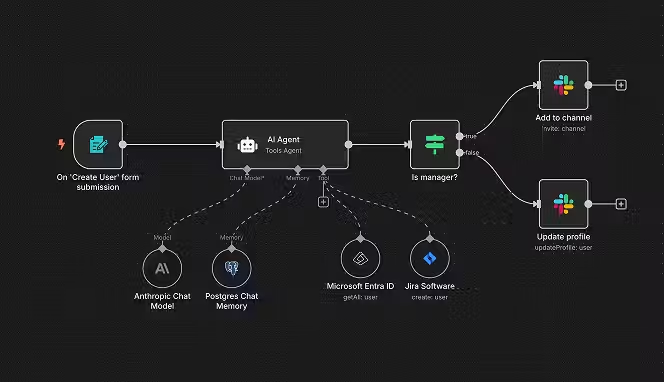
AI workflow automation means you connect apps, triggers, and actions, then drop AI into key decision points so the whole chain runs on its own. Instead of you reading emails, tagging them, copying data, and deciding the next step, an AI workflow does that pattern-matching for you in the background. An AI workflow builder lets you draw this logic visually: “When X happens, send Y here, ask AI to decide, then branch based on that result.”
AI workflow automation tools mix classic rules (if/then, filters, schedules) with language models, vision models, and other smart blocks. You can route leads, summarize long content, classify support tickets, or score risk levels without touching every item one by one. These flows sit inside AI process automation tools that connect CRMs, help desks, spreadsheets, chat apps, and more.
You will often see terms like AI workflow generator, AI workflow designer, or AI workflow automation platforms; these usually point to visual builders that let you sketch flows while AI writes prompts, chooses models, or suggests next steps. There is also a growing discussion of AI workflow vs AI agent: workflows follow a clear path you defined, while agents roam more freely, deciding steps on the fly based on goals and feedback. Most AI automation tools in 2026 now blend both styles, letting you mix predictable paths with smart agents inside the same canvas. Getting that mix right takes some trial and error, which is why many companies turn to AI business automation services to map out the workflow architecture before building anything in-house.
Types of Workflows You Can Automate with AI
You can wire AI into almost any repeat task that starts with data and ends with a decision.
You just need a clear trigger, connected apps, and rules for what “good” looks like.
From sales to HR, there are AI workflow automation examples everywhere right now.
Marketing and content workflows
Marketing teams burn hours turning raw inputs into campaigns. An AI workflow can take new leads, enrich records, tag intent, and feed people into the right sequences without manual cleanup. You could also set up AI automation tools to draft emails, social posts, and ad copy versions based on a single brief, then send only top variations for human review.
Content-heavy teams love an AI workflow generator that turns blog posts into clips, shorts, email snippets, and LinkedIn posts in one sweep. The AI workflow automation platform & tools you pick can watch a content calendar, generate drafts, upload to schedulers, and ping you only when something truly needs judgment. This is where AI workflow automation software shines: less admin, more time spent on angles and hooks. Additionally, you can use a PFP creator to quickly generate professional profile pictures for team members or social media profiles without extra effort.
You can even tie AI workflow automation jobs to lead scores and campaign outcomes. For example, when a campaign crosses a revenue goal, your AI workflow builder can notify sales, update dashboards, and create new experiments based on what worked. That is the kind of loop that turns “set and forget” flows into living systems you adjust weekly instead of hourly.
Customer support and operations workflows
Support inboxes are chaos without structure. An AI workflow can read every incoming ticket, detect language, mood, topic, and urgency, then route it to the right queue or agent in seconds. You can have your AI workflow designer summarize long complaint threads so humans do not scroll for ten minutes before even starting a reply.
AI workflow automation tools now pair well with knowledge bases and chat widgets. You can build flows where AI suggests answers first, logs the full context, then escalates only the tricky edge cases to humans. This setup works nicely in AI workflow vs AI agent debates: workflows handle routing and checks, while agents dig into context and draft responses. You keep control while still leaning on machine reasoning for speed.
Think of back-office ops too: refunds, KYC checks, policy updates, or subscription changes. AI process automation tools can compare incoming data against rules, flag exceptions, and push standard cases straight through to resolution. When you stack enough of these AI workflow automation examples together, your support and ops teams start handling double the volume with the same headcount, but with less burnout.
Data, reporting, and back-office workflows
Reporting chains are full of copy‑paste drudgery that AI eats for breakfast. A good AI workflow automation platform & tools combo can pull numbers from CRMs, analytics, billing, and product logs, then ask AI to summarize trends in plain language for leadership. Instead of chasing screenshots every Friday, you wake up to a digest.
AI workflow automation open source projects like n8n give technical teams more control over where data lives and how it flows. You can self‑host, connect to internal systems, and still tap into large language models or vector databases for smart enrichment and scoring. AI workflow automation n8n setups often glue together internal APIs, cloud services, and AI reasoning inside one board.
Finance, HR, and legal teams can build AI workflow automation tools free or low-cost around approvals, compliance checks, and document review. For example, AI workflow automation tools open source can read contracts, pull key fields, compare them to internal standards, and tag anything risky before a human signs off. That is where AI automation tools feel like a quiet “second pair of eyes” watching every line item.
Where to Find AI Automation Tools?
You will see AI automation tools everywhere now, but you still need a plan so you do not drown in signups. You should start from places where you already spend most of your digital workday.
- App marketplaces inside your existing stack
Platforms such as CRM suites, help desks, and project tools often have built‑in galleries of AI workflow automation tools 2026 partners. Many now highlight AI automation tools with tags, so you can spot which apps come with prebuilt AI workflow automation examples instead of starting from nothing.
- No‑code and low‑code integration platforms
Visual builders like Zapier and Make sit between your apps and act as AI workflow automation platforms once you plug in models and prompts. You can scroll through their template libraries to see AI workflow automation tools, free trials, recipes, and full scenarios other teams already run in 2026.
- Open source directories and GitHub
If you care about control and hosting, search GitHub for projects tagged as AI workflow automation tools open source. Options like n8n give you self‑hosted AI workflow automation platform & tools setups, where you choose models, data stores, and scaling rules.
- Online course platforms and communities
Some AI workflow automation course creators share full templates and stack lists for students. You could pick a course that matches your niche, grab their AI workflow automation examples, then tweak them inside your own AI workflow builder instead of reinventing from zero.
- Job boards and role descriptions
AI workflow automation jobs often list the exact AI automation tools a company expects you to know. If you notice the same AI workflow automation platform & tools stack popping up across listings, that is a sign those tools are sticky in the market.
- Specialist blogs and YouTube channels
Channels that teach Make, Zapier, or AI agents usually share updated “top AI workflow automation tools” breakdowns with live builds. You can watch how they wire AI workflow vs AI agent patterns, then copy the parts that fit your own use cases.
- Vendor events and webinars
Tool vendors run live events showing new AI workflow automation tools free tiers, demos, and customer stories. Those sessions often reveal new AI workflow automation software features months before casual users notice them inside dashboards.
Benefits of AI Automation Tools for Workflows
Once you wire in a few flows, you will see the “before vs after” gap fast. You can treat AI automation tools as digital interns who never sleep, but can also read, write, and decide.
- Time back from repeat tasks
AI workflow automation tools watch for triggers and handle the same steps you used to repeat manually: logging, tagging, routing, drafting, and summarizing. That frees you for strategy, calls, and experiments instead of endless admin.
- Cleaner data and fewer mistakes
AI process automation tools can standardize formats, fix obvious typos, and fill missing fields based on context. You cut down on bad records that used to quietly ruin reports or break future workflows.
- Faster decisions across teams
AI workflow automation platforms can summarize long threads, tickets, and reports into short, action‑ready notes. Sales, support, and ops no longer wait days for someone to sift through history before making a call.
- Better customer experience at scale
When you plug AI automation tools into support and onboarding, replies arrive sooner and feel more context‑aware because the AI reads full histories first. Humans still approve tricky replies, but the queue moves faster and feels less random.
- More experiments without bigger headcount
AI workflow automation software lets you spin up new flows for campaigns, pricing tests, or onboarding tweaks without hiring extra coordinators. You can retire what does not work and keep what does, turning workflows into an ongoing lab.
- Lower vendor lock‑in for technical teams
AI workflow automation open source options such as n8n let you self‑host, pick your own models, and keep data under your rules. If pricing or policy shifts bother you, you can move stacks without throwing away all logic.
- Career growth for operators and analysts
Learning AI workflow automation tools in 2026 lines you up for AI workflow automation jobs like “AI automation engineer” or “AI operations manager.” You could start by owning one AI workflow automation course, then roll that knowledge into internal training sessions and consulting.
12 Best AI Workflow Automation Tools in 2026
Here is a list of the best AI automation tools for 2026. These are great for any workflows:
1. Zapier
Zapier started as a simple app connector and now feels more like an AI control center for non‑technical teams. The platform’s AI by Zapier steps, agents in Zaps, and Copilot assistant mean you can describe a workflow in plain language and have most of it drafted for you. Recent updates also added smarter form generation, richer data enrichment, and multi‑step AI orchestration across apps. If you need AI automation tools that play nicely with thousands of SaaS apps, Zapier still dominates that space in 2026.
Key features
- AI-assisted workflow building
You can ask Copilot to build or edit Zaps in natural language, instead of hunting through menus for each trigger and action. That keeps setup time low even when flows involve several branches and many apps.
- AI by Zapier steps for LLM tasks
Dedicated AI steps handle summarization, classification, enrichment, and text generation inside your workflows. You plug in your model of choice or bring your own API keys, then chain outputs to later steps.
- Agents inside Zaps
Zapier Agents can make decisions across multiple steps, not just one prompt at a time. That brings AI workflow vs AI agent business ideas together inside one familiar automation canvas.
- Support for multiple AI providers
Zapier lets you choose between OpenAI, Anthropic, Google’s Gemini, Azure OpenAI, and more, often with some models available on a built‑in plan. That flexibility matters if pricing or compliance rules shift.
- Smart output formatting and variables
Newer features like smart output fields and global variables keep AI responses structured so later steps never break on messy text. You spend less time debugging weird edge cases.
- Interfaces and Tables tied to AI
Interfaces can auto‑build forms from prompts, and Tables can run AI Enrich across rows to fill out summaries or tags in bulk. That makes Zapier feel like an AI workflow builder plus lightweight database in one place.
2. Cflow
Cflow is an AI-powered approval automation platform that can automate complex workflows with multiple approval levels. The visual no code workflow builder in Cflow enables users to build process workflows based on business rules, within minutes. The AI automation feature helps in streamlining workflows, reading documents, filling forms, flagging issues, and keeping approvals on track without anyone having to chase anything manually. Seamless integrations with 1000+ apps allows teams to work collaboratively. If you are looking for an AI-powered automation tool that simplifies decision making, then Cflow is your one stop solution.
Key features
- AI-Powered Workflow Builder:
No-code, visual drag-and-drop workflow interface that helps users design custom forms, map out parallel paths, and configure conditional branching, and eliminates any dependency on the IT department. - Automated Routing
Beyond basic linear approvals, this system supports complex multi-level routing matrices based on specific parameters (like department, project type, or dollar thresholds).
- Intelligent Decision Making (Seyarc AI)
Seyarc AI functions as a continuous intelligence layer built straight into your business processes to study user habits and process history. - Integrations
While it native-connects seamlessly with over 1,000 external applications through Zapier (including Slack, Google Workspace, and Salesforce), Cflow also accommodates custom setups. - Intelligent Document Processing
Document Designer that allows users to automatically generate customized, professional PDFs directly out of your workflow data and populating relevant form fields without manual data entry.
3. Make
Make has grown from a visual automation tool into a serious AI workflow automation platform & tools suite with agent support. The canvas lets you drag modules, branch flows, and watch executions step by step as data moves between services. In 2026, Make pushes hard on AI agents that act on goals, not just triggers, while still giving you clear logs and control. If you like seeing your whole AI workflow mapped in one view, Make will feel natural.
Key features
- Visual AI workflow designer
You build flows with a node‑based editor where each module is an action, trigger, or AI step. This style makes complex AI workflow automation examples easier to explain to non‑technical teammates.
- AI agents on the same canvas
Make lets you add agents that can route leads, triage incidents, or process tickets based on goals and rules you define. They can choose paths dynamically instead of following a single fixed branch.
- Deep app ecosystem and branching
With thousands of integrations and routers, you can send data down many different paths from the same trigger. That suits teams running multi‑brand or multi‑country setups who still want one AI workflow.
- Grid for monitoring AI workflows
Make Grid gives you a live map of every agent, app, and scenario plus real‑time analytics. You spot bottlenecks and errors quickly instead of guessing where runs got stuck.
- LLM modules for content and analysis
Built‑in AI modules handle enrichment, sentiment checks, classification, and content generation. You do not need to write custom code just to add basic AI reasoning.
- Strong learning path and courses
There is a growing ecosystem of Make AI workflow automation course content, templates, and tutorials that teach both classic and AI‑powered flows. That shortens the time from “new user” to advanced builds.
4. n8n
n8n is a fair‑code, self‑hostable workflow platform popular with technical teams who want AI workflow automation open source. It blends a visual editor with the option to drop into JavaScript or Python when you need custom logic. n8n has native AI features and dedicated integrations for OpenAI, LangChain, and other AI stacks, which makes it a strong pick for AI workflow automation n8n projects. If you care about hosting, privacy, and flexibility, this tool sits high on any list of best AI workflow automation tools.
Key features
- Self-hosting and cloud options
You can run n8n on your own servers or use n8n cloud, with the same visual editor in both cases. That choice matters for regulated sectors that cannot send data anywhere.
- AI-native design and LangChain nodes
n8n ships LangChain nodes and AI features so you can build agentic workflows that call different tools, models, and memories. This suits teams building complex AI orchestration across internal and external services.
- Hybrid no-code and code
The editor lets you drag nodes visually, then add custom code blocks where needed. That sweet spot keeps non‑developers involved while still giving engineers full control.
- Large template and integration library
With hundreds of nodes and many ready workflows, you can start from proven AI workflow automation examples instead of a blank board.
- Enterprise features and permissions
n8n includes options like SSO, advanced permissioning, and even air‑gapped deployments for enterprise use cases. Those features make it a serious choice among AI workflow automation tools 2026 for larger organizations.
- Research-backed performance
Academic work has benchmarked n8n for AI orchestration and enterprise integration, showing strong reliability and scaling behavior under load. That gives technical buyers more confidence when pitching it internally.
5. Microsoft Power Automate
Microsoft Power Automate sits inside the broader Microsoft Power Platform and links naturally to Microsoft 365, Dynamics 365, and hundreds of outside services. It combines classic flows with AI Builder, which lets you add document processing, prediction models, and text analysis blocks without deep ML knowledge. For teams already living in Outlook, Teams, and SharePoint, it feels like a natural hub for AI workflow automation tools inside the Microsoft stack.
Key features
- Tight integration with Microsoft 365
You can set up flows that react to messages, files, calendar events, and forms across Outlook, Teams, SharePoint, and OneDrive. That helps centralize AI workflow automation examples around your existing collaboration habits.
- AI Builder components
Prebuilt AI models for form processing, object detection, and prediction slot into flows as simple actions. You choose data sources, train or fine‑tune, then drop those models into approvals, routing, and scoring logic.
- Desktop and UI automation
Power Automate Desktop lets you record clicks and keystrokes on legacy apps, then combine that with AI steps for reading screens or documents. This bridge matters when some systems do not offer APIs.
- Governance and security controls
Admins can manage connectors, data loss policies, and environment rules from the Power Platform center. That makes it easier to roll out AI automation tools without wild-west sprawl.
- Template library and community
Thousands of templates show flows for HR, finance, IT, and more. You can remix them into AI workflow automation tools free trials by dropping in AI Builder steps or external LLM calls.
Start your dropshipping business today
6. UiPath
UiPath began in robotic process automation and now positions itself as a full AI process automation tools stack. It focuses on enterprise workflows that cross many systems, including desktop apps, virtual machines, and web tools. UiPath’s AI components handle document understanding, communications mining, and model‑driven routing at scale. If your company already uses bots for back‑office tasks, adding AI on top inside UiPath is a natural next layer.
Key features
- Strong RPA plus AI mix
UiPath can mimic user actions on old systems that lack APIs, then pass captured data into AI models for classification or extraction. That unlocks AI workflow automation tools for processes that were stuck in spreadsheets and terminals.
- Document understanding suite
UiPath has templates and models for invoices, receipts, KYC forms, and more. You can train or adjust models to your own layouts, then bake them into finance and compliance workflows.
- Process mining and task mining
The platform can observe how users click through systems, then suggest automation candidates. Once you see where time goes, you can design AI workflow automation software flows to tackle the biggest pain points first.
- Enterprise-grade controls
Centralized orchestration servers, audit logs, and access controls suit regulated environments. Larger teams can roll out thousands of bots while still keeping track of who owns what.
- Marketplace and partner ecosystem
UiPath’s marketplace offers prebuilt components, workflows, and integrations from partners. That library shortens the path from concept to running AI workflow automation platforms projects.
7. Pipedream
Pipedream is a developer‑friendly automation platform that mixes serverless code with a simple workflow UI. It is popular with technical users who want fine‑grained control but still appreciate quick triggers and prebuilt integrations. Pipedream treats each step as a small piece of JavaScript, so adding AI calls, logging, and custom logic feels natural if you write code daily.
Key features
- Code-first workflow model
Each step is JavaScript by default, so you can integrate any AI API or SDK you like. This design suits teams who want AI workflow automation tools open source‑style flexibility without managing all the infra.
- Event-driven triggers
Pipedream listens to webhooks, schedules, and app events, then runs workflows in response. That fits AI workflow automation examples like “summarize every new GitHub issue” or “score every incoming lead.”
- Managed infra with generous free tier
The platform hosts the runtime, so you focus on logic and secrets. Many smaller AI automation tools use Pipedream behind the scenes for glue code.
- Extensive integration catalog
Hundreds of sources and targets give you wide reach across SaaS, databases, and messaging services. You can chain multiple AI providers in one flow if needed.
- Developer-centric monitoring
Logs, metrics, and debugging tools feel familiar to engineers used to cloud functions. That makes iterating on AI workflow automation tools free experiments less painful.
8. Workato
Workato targets mid‑market and enterprise teams that want powerful automation without writing custom platforms from scratch. It offers recipes for finance, HR, sales, and IT, plus strong governance and role‑based controls. Workato has added AI steps for text analysis, routing, and enrichment, letting companies bring intelligence into existing “recipe” libraries instead of rebuilding everything.
Key features
- Recipe-based automation
Workato calls workflows “recipes,” many of which target specific industries and departments. You can adapt these into AI workflow automation tools by inserting AI steps for scoring, summarizing, and routing.
- Enterprise connectors and ERP support
Workato connects cleanly to major ERPs, CRMs, and data platforms. That reach matters when AI workflow automation tools need to sit between finance and sales systems, not just SaaS side tools.
- AI-powered data enrichment
Built‑in AI steps can enrich contact, company, and transaction data from multiple sources. Teams use this to keep their data warehouse and CRM aligned.
- Collaboration between IT and business
Role‑based access lets IT own governance while business users maintain and tweak recipes. This structure keeps AI workflow automation jobs from turning into shadow IT.
- Monitoring and governance
Detailed logs, approvals, and controls help larger organizations stay comfortable as they roll out more AI automation tools across teams.
9. Tines
Tines is an automation platform built mainly for security and operations teams. It works well when you need strict control, structured stories, and repeat responses to incidents. Although it does not market itself only as “AI,” Tines users increasingly add AI steps for alert triage, enrichment, and response drafting. That turns SOC and incident workflows into sharper “detect and respond” pipelines.
Key features
- Story-based workflows
Tines models processes as “stories,” which are chains of actions tied to triggers and inputs. These stories can include AI steps that classify alerts, summarize logs, or propose responses.
- Security-first design
The product focuses on secure handling of secrets, logs, and data sources common in security teams. That makes AI workflow automation tools safer in sensitive environments.
- Wide range of connectors
Tines reaches SIEMs, ticketing tools, chat apps, and threat intel feeds. You can build AI workflow automation examples like auto‑triage for phishing or suspicious login alerts.
- Human-in-the-loop controls
Many teams run AI steps to propose actions but still require human approval for final steps. This pattern keeps trust high while still gaining speed from AI.
- Scalable for large incident volumes
Security teams can run thousands of stories per day without drowning in manual work. AI steps reduce noise so humans see only the important events.
10. Simplified
Simplified is an AI-powered productivity platform that combines AI workflow automation, content creation, design, video editing, social media management, and team collaboration in one workspace. Its AI Workflows feature helps businesses automate repetitive tasks, generate content at scale, streamline approvals, and connect everyday marketing and operational processes-making it a practical choice for growing teams that want to save time without relying on multiple tools. Key Features
- AI Workflow Automation for repetitive business and marketing tasks.
- Drag-and-drop workflow builder with customizable automation.
- AI writing, image generation, video creation, and presentation tools.
- Built-in social media scheduler and publishing.
- Team collaboration with approvals, shared workspaces, and brand management.
- Supports integrations across popular business applications.
Pros
- All-in-one platform for content creation and workflow automation.
- Beginner-friendly interface with minimal learning curve.
- Helps reduce manual work through AI-powered automations.
- Suitable for individuals, agencies, and marketing teams.
- Combines multiple AI tools in a single subscription.
Cons
- Advanced workflow customization is lighter than enterprise automation platforms.
- Some premium AI features are available only on higher-tier plans.
- Larger automation projects may require paid plans.
Pricing
- Free Plan available
- Pro - Starts at $24/month (annual billing available)
- Business & Enterprise - Custom pricing
Best For: Marketing teams, agencies, content creators, and businesses looking for an easy-to-use AI workflow automation platform that combines content creation with business productivity. Please check it and let me know once it is live.
11. Coupler.io
Coupler.io is a no-code data integration platform and AI analytics solution built for teams that want their reporting on autopilot rather than stitched together every Monday morning. Instead of routing tickets or drafting emails, it focuses on the unglamorous but constant task of pulling numbers out of CRMs, ad platforms, and billing tools and getting them somewhere useful automatically. It also connects directly with Claude and ChatGPT, so instead of building a new dashboard for every question, you can just ask your data what's going on.
Key features
- Automated data pipelines
Coupler.io schedules recurring data pulls from 400+ sources like Google Ads, Shopify, HubSpot, and Stripe straight into Google Sheets, Excel, or a data warehouse, so reports refresh themselves instead of requiring a manual export. - AI-assisted analysis via Claude and ChatGPT
Once your data lands somewhere centralized, Coupler.io's Claude and ChatGPT integrations let you ask plain-language questions about performance instead of building a new chart every time leadership wants an update. - No-code setup
Non-technical teams can configure a working data flow in minutes through a visual interface, without writing scripts or maintaining custom API connections. - Built-in dashboard templates
Prebuilt templates for sales, marketing, and finance reporting mean you're not starting from a blank sheet every time you need a new view of the business. - Flexible scheduling
Data refreshes can run hourly, daily, or on custom schedules, so back-office reporting stays current without anyone touching it.
12. ZenBusiness Velo
ZenBusiness Velo is an AI business assistant that handles registered agent service, ongoing compliance, and LLC formation. It keeps the legal and administrative side of a business running in the background: forming the entity, receiving official correspondence, and tracking filing deadlines so nothing slips. For founders setting up a brand‑new company, Velo closes the gap between "I have an idea" and "I have a registered business ready to operate."
Key features
- Registered agent service: ZenBusiness can act as your registered agent, receiving legal and state correspondence on your behalf and keeping those documents organized in one place.
- Compliance tracking and reminders: Velo watches filing deadlines like annual reports and flags what's due, reducing the risk of penalties or an administrative dissolution.
- Beginner‑friendly, plain‑language guidance: No legal or technical background needed. You ask questions in everyday language and Velo clarifies the steps and does the work, making it approachable for first‑time founders.
- Guided business formation: Velo walks you through forming an LLC or corporation and files the paperwork with your state, so you skip the manual research on requirements and fees.
- Free to use: Velo is free with no subscription required, so it fits into a starter stack without adding another recurring cost.
Conclusion
AI workflow automation tools are not just fancy toys; they are how you take back your calendar in 2026. You do not need to be an engineer to wire AI into day‑to‑day work, but you will need curiosity and a bit of patience while you learn. Start with one or two painful workflows, plug in AI automation tools that play nicely with your stack, and watch the baseline shift. Once you see that first “I didn’t touch this and it still got done” moment, you will never look at manual busywork the same way again.
Are you looking for a dropshipping automation tool? Check out Spocket!
FAQs about AI automation tools
What are AI automation tools and how do they differ from basic automation apps?
AI automation tools connect your usual apps, then drop AI in the middle to read, write, and decide, not just move data around. A basic rule might copy a form entry to a sheet; an AI workflow adds scoring, tagging, and summaries on top. AI workflow automation tools can also compare AI workflow vs AI agent styles, mixing predictable paths with more flexible reasoning inside one setup.
Which AI automation tools are best for small teams in 2026?
For small teams, popular picks among the top AI workflow automation tools include visual builders, open source options, and code‑friendly platforms that still feel light to manage. You could pair AI workflow automation tools free tiers from platforms like Make or Zapier with AI workflow automation open source tools such as n8n. That combo gives you plenty of room to grow without a heavy upfront bill.
Are there free AI workflow automation tools I can start with?
Yes, there are free AI workflow automation tools and generous starter tiers on many paid platforms. Some AI workflow automation tools free plans limit runs or premium connectors, but they are enough to build early AI workflow automation examples for email triage, lead scoring, or content summarizing. If you are comfortable hosting, AI workflow automation tools open source like n8n give you long‑term freedom with only infra costs.
How can I build a career around AI workflow automation tools?
Companies now hire for AI workflow automation jobs such as automation engineer, AI operations specialist, or AI workflow consultant. You should learn at least one AI workflow generator, one AI workflow builder, and one AI workflow designer, then ship real projects for your team or clients. Pair that practice with an AI workflow automation course or two, share case studies, and you will stand out as someone who can move work off human plates and into reliable flows.


Launch your dropshipping business now!
Start free trial.avif)


Related blogs

Minea Review: Is It Worth It for Dropshipping Product Research?
Read this Minea review to explore its features, pros, cons, pricing value, and whether it is the right product research tool for dropshipping sellers.


Top AI Tools for Small Businesses in 2026
Learn about the top AI tools for small businesses in 2026 for content, finance, agents, and automation. Pick the best AI tools for small businesses that match your workflows and budget, from free and paid.


Which are the Best Print on Demand AI Tools in 2026?
Find out which are the Print on demand AI tools in 2026. Save time, boost ROI, and improve product quality. Compare features, pricing, and real workflows for POD stores.
