


How to Shop on Pinterest: The 2026 Buyer's Guide
Learn how to shop on Pinterest with our step-by-step guide. Find products, use visual search, check prices, and buy directly from retailers. Start shopping today.

You found the perfect picture. A cozy living room with a sectional sofa you have to own. A outfit that would look amazing at your friend's wedding. A kitchen gadget that would solve every meal prep problem. You click hoping to buy. Then nothing. Just a dead end with no link and no product information.
That frustration used to be common. Not anymore. Pinterest has transformed from a dream board into a fully functional shopping engine. Over 600 million people now use the platform monthly, and most come with buying in mind . In fact, 75% of weekly users say they are "always shopping" when they open the app.
This guide teaches you exactly how to shop on Pinterest in 2026. You will learn to find products, check prices, and buy with confidence. No more dead ends. No more frustration. Just clear steps to turn inspiration into ownership.
What Makes Pinterest Different for Shopping?

Pinterest is not social media. It is a visual search engine . This distinction matters because people use it differently. On Instagram, you scroll to see what friends post. On Pinterest, you search for specific ideas and products.
Purchase Intent from the Start
Users arrive with shopping on their minds. Research shows that people who use Pinterest weekly are 40% more likely to say they love shopping . They are not killing time. They are planning purchases. This intent means when you find a product you like, it is probably available to buy.
Visual Discovery Leads to Action
The platform's visual nature makes product discovery natural. You see a room design you love and immediately wonder where to buy that rug. Pinterest answers that question with integrated shopping features. The platform reports that 88% of users have purchased a product after seeing it on Pinterest .
Different Ways to Shop on Pinterest
Pinterest offers multiple paths to purchase. Each works slightly differently. Understanding them helps you shop smarter.
Product Pins: The Foundation of Shopping

Product Pins are the backbone of Pinterest shopping. These special pins display real-time pricing, availability, and product descriptions . When you see a price tag icon on a pin, you know it is shoppable. Clicking the pin takes you directly to the retailer's site where you can complete your purchase.
The product catalog connection keeps information accurate. If a price drops or an item sells out, the pin updates automatically . You never waste time clicking on sold-out products or outdated prices.
"Shop the Look" Pins
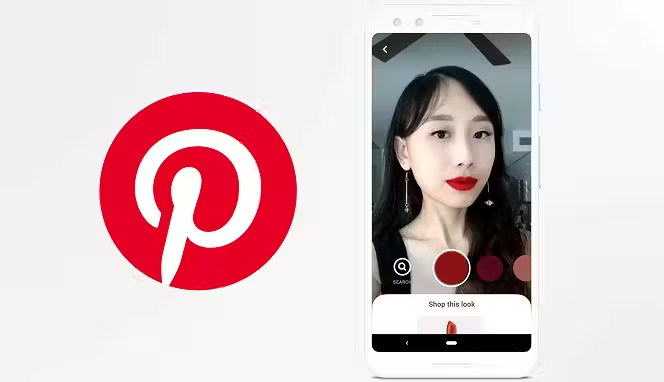
Some images feature white dots scattered across the scene. Clicking a dot highlights a specific item in the photo. You might see a living room image with dots on the sofa, the lamp, and the coffee table. Each dot links to that product's purchase page.
This feature transforms inspirational images into shopping opportunities. You see the whole styled scene, then buy individual pieces to recreate it yourself.
Visual Search with Pinterest Lens
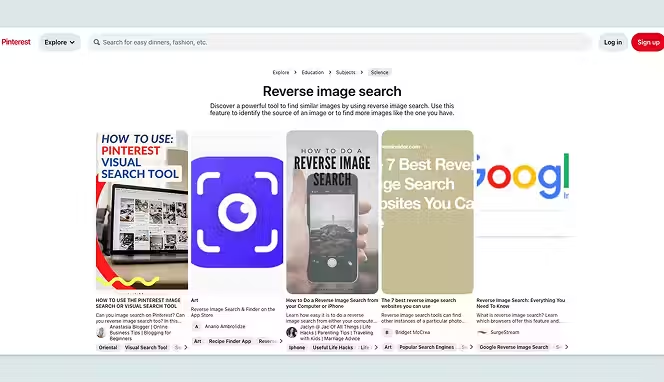
Pinterest Lens changes how you shop in the real world. Open the Pinterest app, tap the camera icon in the search bar, and take a photo of anything you see . A jacket someone wears on the street. A chair at a coffee shop. A lamp in a hotel lobby.
Lens searches Pinterest for visually similar products and shows you where to buy them . This tool turns everyday inspiration into immediate shopping opportunities. You no longer wonder "where can I find that?" You simply snap and search.
Shopping Recommendations
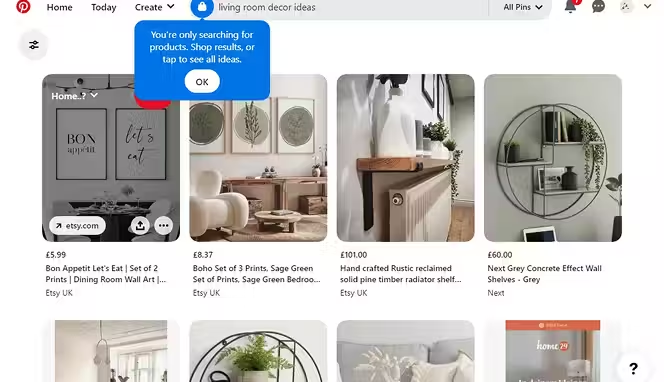
Scroll below any style or home pin, and you will find a "shopping recommendations" section. Pinterest displays similar, in-stock items from various brands . This feature helps you compare options across different price points and retailers without starting a new search.
Verified Merchants
Look for the blue checkmark on profiles and pins. This badge identifies verified merchants who have met Pinterest's quality, shipping, and return policy standards . Shopping from verified merchants reduces risk. You know these sellers have been vetted and maintain professional business practices.
How to Shop on Pinterest: Step by Step
Follow these steps to purchase products successfully. The process works the same whether you use desktop or mobile.
Step 1: Find a Product
Open Pinterest and use the search bar to look for ideas. Type what you want, like "summer dresses" or "home office ideas." Browse the results. Look for pins with price tags or "Shop" labels. These indicate shoppable products.
You can also use filters to narrow results. After searching, look for filter options that let you sort by product type or price range. This helps you find exactly what you want faster.
Step 2: Check Product Details
Click any shoppable pin to open it. You will see the product image, current price, availability status, and description. Verify the details match what you want. Check sizing, color options, and shipping information when available.
For pins without direct product links, look for "visit site" buttons or links in the pin description. Many pins still lead to blog posts or retailer pages where you can learn more.
Step 3: Click Through to Purchase
Click the "Visit" button or the product link. This action takes you directly to the retailer's website . Pinterest does not process payments directly. The platform acts as a catalog that leads you to external stores where transactions happen.
Step 4: Complete Your Purchase
On the retailer's site, add the item to your cart and check out normally. Enter your shipping information and payment details. The retailer handles everything from payment to delivery.
After purchasing, you can return to Pinterest and save the pin to a board. This creates a record of what you bought for future reference.
Shopping on Pinterest with Your Phone
Mobile shopping dominates Pinterest usage. The platform delivers 45% more affiliate traffic from mobile than desktop . Here is how to shop effectively on your phone.
Using the Pinterest App
Download the Pinterest app from your device's app store. The app includes all shopping features optimized for touch screens. Product details display clearly. Buttons are easy to tap. The experience feels natural on smaller screens.
Shopping from Your Camera Roll
Save images you find online or take photos of things you see. Open Pinterest, tap the search bar, and select the camera icon. Choose an image from your camera roll to search for similar products. This works great for items you spotted days ago but cannot find.
Managing Your Shopping List
Pinterest automatically tracks products you engage with. Your shopping list consolidates all saved product pins in one place . The list even notifies you when prices drop on saved items. Check this section regularly to catch sales on products you want.
Shopping in India and Other Countries
Can we shop from Pinterest in India? Yes, but with some considerations. Pinterest shopping features continue expanding globally. Many international retailers list products visible to Indian users. However, you must check whether each retailer ships to India before getting excited about a product.
Checking International Availability
Before clicking through to purchase, look for shipping information. Some retailers ship worldwide. Others restrict to specific countries. The product pin may not indicate shipping restrictions, so verify on the retailer's site before completing your purchase.
Currency and Pricing
Product pins display prices in various currencies. When you click through to the retailer, prices may convert to your local currency. Factor in currency conversion rates and potential international shipping costs when evaluating deals.
Selling vs. Shopping on Pinterest
Understanding the difference between buyer and seller features helps you navigate the platform.
Creating a Pinterest Shop
Businesses can create a Pinterest shop to showcase their products. This requires a business account, claimed website, and product catalog connection . Verified merchants display a blue checkmark and access additional analytics.
For Pinterest business help, the platform offers extensive documentation and support. Business accounts unlock features like analytics, ads, and shopping tools that personal accounts cannot access. Check out our Pinterest affiliate marketing guide.
How to Upload Your Products on Pinterest
If you are a business, you can upload your products on Pinterest through catalog feeds or manual pin creation. The platform integrates with major e-commerce platforms including Shopify and WooCommerce . This integration automatically syncs inventory and pricing.
Many businesses use Pinterest dropshipping strategies to promote products without holding inventory. They create inspiring pins that link to dropshipping suppliers who handle fulfillment. You can experiment with different Pinterest marketing strategies.
New Ways to Shop with Pinterest
Pinterest continuously adds shopping features. The shop tab on business profiles helps merchants organize products into categories like "new arrivals" or "sale items" . This organization helps shoppers browse collections rather than individual pins.
Shop Products for You
The shop products for you section appears in home feeds based on your interests. Pinterest's algorithm learns what you save and search for, then recommends relevant products. This personalized shopping experience improves over time as you use the platform.
Shopping Spotlights
Pinterest curates shopping spotlights featuring products trending in specific categories . These editorially selected collections help you discover new brands and products aligned with current trends.
Conclusion
Pinterest has evolved from inspiration boards into a powerful shopping destination. You can find products through visual search, curated recommendations, and personalized feeds. Product Pins show real-time pricing and availability. Verified merchants provide trust signals. The platform connects you directly to retailers where purchases happen. Mobile shopping works seamlessly through the app.
International users can participate, though shipping restrictions vary by retailer. Whether you search for fashion, home decor, or unique gifts, Pinterest offers a visual shopping experience that turns ideas into purchases. The tools exist. The products are waiting. Now you know exactly how to use them. Start Pinterest product dropshipping with Spocket today.
Start your dropshipping business today
How to Shop on Pinterest? FAQs
How to shop on Pinterest for free?
Shopping on Pinterest costs nothing. You browse, click, and purchase without paying any platform fees. The retailers you buy from pay any associated costs. Create a free account, search for products, and click through to retailer sites to complete purchases.
How to shop on Pinterest on the phone?
Download the Pinterest app from your app store. Open it and search for products using the search bar. Tap any pin with a price tag to see details. Click "Visit" to go to the retailer's site where you complete your purchase. The mobile experience mirrors desktop functionality.
Where to buy Pinterest clothes?
Clothing appears throughout Pinterest. Search for specific items like "summer dresses" or browse fashion boards. Look for product pins with price tags. Click through to retailer sites including major brands, boutique shops, and marketplaces. Many clothing retailers list their entire catalogs on Pinterest.
Can you have a shop on Pinterest?
Yes, businesses can create shops on Pinterest. You need a business account, claimed website, and product catalog. Once approved through the Verified Merchant Program, your profile displays a shop tab where customers browse your products . This feature helps businesses sell directly through the platform.
How does shipping work on Pinterest?
Pinterest does not handle shipping. Each retailer manages its own shipping policies, costs, and delivery times. When you click through to purchase, check the retailer's shipping information before completing your order. Delivery times vary based on location and shipping method selected.
How to access the Pinterest shopping list?
Your shopping list lives in your profile. Tap your profile photo, then look for the shopping bag icon or "Shopping list" option. This section collects all product pins you have saved or engaged with. Pinterest also notifies you here when prices drop on saved items.


Launch your dropshipping business now!
Start free trial.avif)


Related blogs

What Is Amazon Haul
Discover what is Amazon haul beta, how it works, benefits, and tips to create, customize, and share hauls for a fun, social shopping experience on Amazon.


Is Facebook Marketplace Safe
Worried about scams on Facebook Marketplace? Learn how safe it really is, how to spot fraud, protect your money, and make smarter buying or selling decisions.

10 Amazon Alternatives
Explore top alternatives to Amazon offering unique, ethical products, fast shipping, and a focus on small businesses. Find your perfect shopping platform today.
