


Product Photography for Dropshipping: How to Make Supplier Images Look Premium
Upgrade supplier product images with simple editing, better visuals, lifestyle shots, and SEO-friendly photo practices for a premium dropshipping store.
.avif)

Product photography is one of the biggest trust signals in a dropshipping store. Since customers cannot see or touch the product in person, your images have to do the heavy lifting. They show what the product looks like, how it works, how big it is, and whether your store feels reliable enough to buy from.
The problem is that many dropshipping stores use the same supplier images. These photos may be low quality, inconsistent, overused, or poorly edited. When customers see the same product photo across multiple websites, your store can feel generic even if your products are useful.
That is why product photography for dropshipping matters. You do not always need a professional studio or expensive camera. You need a clear process for improving supplier images, creating consistency, adding lifestyle context, and making your product pages look more polished.
With better visuals and reliable product sourcing through Spocket, your store can feel more premium, trustworthy, and ready to convert.
Why Product Photography Matters in Dropshipping
Your product photos create the first impression before shoppers read your description or check your price. A clean, clear image can make a product feel valuable. A blurry or cluttered image can make the same product feel cheap.
This is especially important in dropshipping because new customers may not know your brand yet. They may already be comparing similar products across different stores. If your photos look copied or low effort, customers may leave or choose the lowest price elsewhere.
Strong product photography helps you:
- Build trust faster
- Show product quality clearly
- Explain size, color, and use cases
- Improve product page conversions
- Make collection pages look consistent
- Support ads, emails, and social content
- Reduce customer confusion before purchase
Premium images also increase perceived value. A simple storage basket, pet accessory, beauty tool, or phone stand can look more desirable when shown with clean lighting, proper cropping, and real-life context.
In dropshipping, better photos are not just design improvements. They are part of the sales experience.
What Makes Supplier Images Look Generic?
Supplier images are useful when launching a store, but they are rarely built for branding. Most are created to show the product quickly, not to make your store look premium.
Many supplier photos come with different backgrounds, lighting styles, image sizes, and angles. When placed together on one website, they can make your catalog look inconsistent. Even worse, the same images may appear on several other stores.
Common supplier image issues include:
- Low resolution
- Poor lighting
- Messy backgrounds
- Watermarks
- Inconsistent cropping
- Overedited colors
- Missing lifestyle shots
- No scale reference
- Few close-up details
- Duplicate images across competitors
These issues affect trust. If a customer cannot clearly understand the product, they may hesitate. If the image looks copied, they may question whether your store is reliable.
You do not need to replace every image at once. Start with your most important products: best sellers, homepage items, ad products, and high-margin products. Improving these first can have the biggest impact.
How to Make Supplier Images Look Premium
Supplier images give you a starting point, but they should not be the final version of your product page visuals. To make your dropshipping store look more professional, you need to refine those images with better backgrounds, consistent cropping, lifestyle context, accurate editing, and clear product details.
The goal is not to make the product look unrealistic. It is to present it in a way that feels clean, trustworthy, and easier for shoppers to understand before they buy.
1. Start With Better Supplier Images
Better product photography starts before editing. If the original supplier images are extremely poor, editing can only do so much. Choosing products with stronger image assets makes your store easier to polish.
When reviewing products, look beyond price and shipping. Check whether the supplier provides enough visual material to build a complete product page.
Look for supplier images that include:
- Multiple product angles
- Clean background shots
- Lifestyle images
- Close-up details
- Variant photos
- Size references
- Packaging images
- Clear color representation
- Consistent image quality
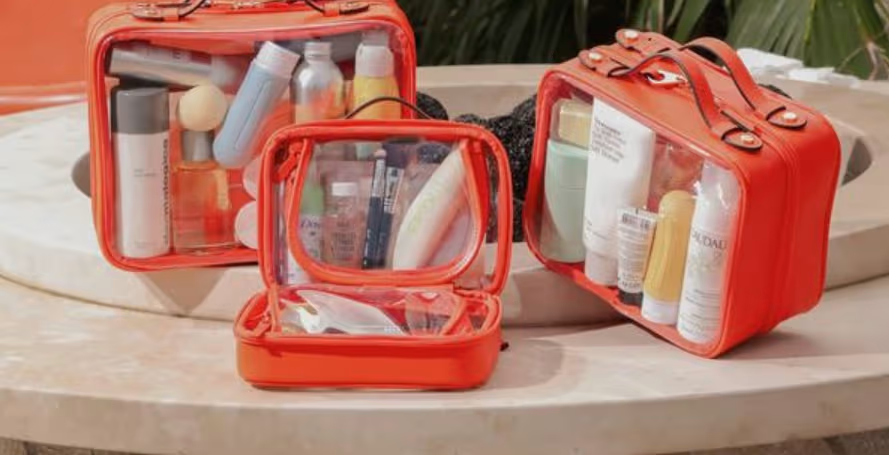
For example, if you are selling a travel organizer, one front-facing image is not enough. Customers may want to see the inside compartments, size in hand, how it fits in luggage, available colors, and how it looks when filled.
This is where Spocket can help. Spocket gives dropshippers access to vetted suppliers and a wide product range, making it easier to choose products that match your store’s niche and visual direction. Better sourcing gives you better starting material for product pages, collection pages, and marketing creatives.
If possible, order samples for your top products. This lets you check quality, understand packaging, and create your own photos or videos.
2. Create a Consistent Visual Style
A premium dropshipping store should feel like one brand, not a mix of random supplier listings. Consistency is what makes your store look intentional.
Your visual style does not need to be complicated. It can be built around simple rules for image size, background, brightness, and cropping.
Set basic image guidelines such as:
- Use the same image ratio for product thumbnails.
- Keep backgrounds clean and simple.
- Use similar brightness across all products.
- Keep the product centered where possible.
- Avoid heavy text overlays.
- Use close-ups for important details.
- Keep collection images visually aligned.
- Use lifestyle images that match your brand mood.
Consistency helps customers feel that your products are curated. It also makes your store look more professional, even if the products come from different suppliers.
3. Clean Up Backgrounds and Cropping
One of the fastest ways to make supplier images look premium is to clean the background. A cluttered background distracts from the product and can make the page feel unprofessional.
For main product images, white or neutral backgrounds usually work best. They keep attention on the product and create a cleaner collection page.
Use background cleanup for images that have:
- Messy surfaces
- Random props
- Harsh shadows
- Supplier logos
- Distracting colors
- Uneven lighting
- Cluttered rooms
After removing or cleaning the background, make sure the product still looks natural. Avoid fake-looking cutouts, sharp edges, or unrealistic shadows.
Cropping also matters. Products should appear balanced and easy to compare. If one product image is zoomed in and another is tiny, your collection page will look messy.
Good cropping should:
- Keep the product centered
- Leave enough white space
- Show the full product clearly
- Avoid cutting off important details
- Keep similar products at similar sizes
Think of your main image as the product’s introduction. It should be simple, sharp, and easy to understand.
4. Add Lifestyle Images for Context
Clean product images show what the product looks like. Lifestyle images show why someone would want it.
A lifestyle photo places the product in a real situation. This helps shoppers imagine using it in their home, routine, outfit, workspace, or travel setup.
Lifestyle images are especially useful for:
- Home decor
- Kitchen products
- Beauty tools
- Pet accessories
- Fitness products
- Tech accessories
- Baby products
- Travel items
- Fashion accessories
For example, a phone stand looks more useful when shown on a work desk. A storage basket feels more desirable when shown on a shelf. A pet bowl feels more relatable in a clean feeding corner.

Lifestyle images should still be accurate. Do not create visuals that make the product look larger, more premium, or more advanced than it really is. The goal is to add context, not mislead the customer.
5. Show Size, Details, and Real Use
Customers often hesitate when they cannot understand the product clearly. Images should answer the questions a shopper may have before buying.
Show more than one angle. A single front-facing supplier photo rarely gives enough information.
Useful image types include:
- Front view
- Side view
- Close-up detail
- Product in hand
- Product in use
- Size comparison
- Color variants
- Packaging photo
- Before-and-after image
- What’s-included image
Scale is especially important. If a product looks bigger online than it is in real life, customers may feel disappointed. Show the item next to a hand, phone, table, bag, pet, or room setting when relevant.
Close-ups are also important. If a product has stitching, texture, compartments, buttons, hooks, handles, or adjustable parts, show them clearly.
Use-case images can increase confidence. Instead of only showing a drawer organizer, show how it separates utensils. Instead of only showing a cable clip, show how it cleans up a desk.
The more visual clarity you provide, the less guesswork the customer has to do.
6. Edit Images Without Misleading Customers
Editing can improve supplier images, but it should never change the actual product. Your goal is to make the photo clearer, cleaner, and more appealing while keeping the product accurate.
Basic edits can improve:
- Brightness
- Contrast
- Sharpness
- White balance
- Cropping
- Backgrounds
- Shadows
- Color consistency
Avoid heavy filters that change the product color or texture. This is especially important for fashion, home decor, beauty products, and accessories where color accuracy affects purchase decisions.
If a beige item looks white after editing, customers may complain. If a small product looks oversized in a lifestyle image, it can create false expectations.
Use this rule: improve the presentation, but do not change the promise.
Accurate images may not always look the most dramatic, but they create better trust. In dropshipping, trust matters more than over-polished visuals that lead to returns.
7. Use AI Tools Carefully
AI can be useful for improving dropshipping product photos, especially when you do not have access to a studio. It can help remove backgrounds, enhance lighting, create lifestyle scenes, and generate social media creatives. However, AI needs to be used responsibly. If it changes the product shape, size, color, texture, or features, the final image may become misleading.
Use AI for:
- Background replacement
- Image cleanup
- Lighting correction
- Lifestyle scene creation
- Ad visuals
- Collection banners
- Social media creatives
Be careful with:
- Distorted product edges
- Wrong colors
- Fake product features
- Unrealistic scale
- Changed materials
- Extra buttons, straps, or details
- Lifestyle scenes that do not match the product
Always compare the final edited image with the original product. If the AI version looks like a different item, do not use it as a product image.
AI is best used to improve the scene around the product, not to redesign the product itself.
8. Build a Better Product Image Sequence
A premium product page should tell a visual story. The order of your images should help customers understand the product step by step.
Instead of uploading images randomly, arrange them with purpose.
A strong image sequence could include:
- Main product image on a clean background
- Lifestyle image showing the product in use
- Close-up detail image
- Size or scale image
- Variant or color image
- Benefit-focused use-case image
- What’s-included image
- Final lifestyle image
This sequence takes the shopper from basic understanding to purchase confidence. Good product photography is not just about looking attractive. It is about making the product easier to understand.
9. Optimize Product Images for SEO and Speed
Premium product images should also support search performance and store speed. Large, unoptimized images can slow down your site, especially on mobile.
Before uploading images, resize and compress them properly. Keep them sharp enough to look professional but light enough to load quickly.
Image optimization tips:
- Use descriptive file names.
- Add clear alt text.
- Compress image files.
- Keep dimensions consistent.
- Avoid uploading huge raw files.
- Remove duplicate images.
- Test pages on mobile.
- Use clean thumbnails for collections.
Alt text should describe the product naturally. For example, use “white ceramic pet bowl on wooden floor” instead of “product image 1.”
This helps search engines understand your images and improves accessibility for users who rely on screen readers. A premium store should not only look good. It should also load smoothly and work well on mobile.
Common Product Photography Mistakes to Avoid
Small visual mistakes can make a dropshipping store look less trustworthy. Fixing them can instantly improve your product pages. Avoid these common mistakes:
- Using only one supplier image
- Uploading blurry photos
- Keeping watermarks
- Mixing image sizes
- Overediting colors
- Using fake-looking AI scenes
- Not showing product scale
- Ignoring close-up details
- Adding too much text to images
- Using inconsistent backgrounds
- Showing unrealistic product use
- Forgetting mobile display
Another major mistake is making the product look better than it really is. Premium does not mean exaggerated. It means polished, clear, and honest.
If customers receive something very different from what they saw online, they may not buy again. Accurate visuals protect trust and reduce disappointment.
Conclusion
Product photography for dropshipping is not about expensive equipment. It is about clarity, consistency, and trust.
Supplier images can help you start, but they should not make your store look generic. By cleaning backgrounds, improving cropping, adding lifestyle context, showing scale, editing carefully, and building better image sequences, you can make product pages feel more premium.
The goal is simple: help customers understand the product and feel confident buying it.
With reliable sourcing through Spocket and a thoughtful image process, your dropshipping store can look more professional, stand out from competitors, and turn more visitors into customers.
Start your dropshipping business today
FAQs about Product Photography for Dropshipping
Can I use supplier images for dropshipping?
Yes, you can use supplier images if you have permission. However, you should improve them with cleaner backgrounds, consistent cropping, better lighting, and lifestyle context where possible.
How do I make supplier images look premium?
Start by cleaning the background, improving brightness, correcting colors, cropping consistently, adding lifestyle images, and showing product details clearly. Keep the product accurate while improving presentation.
Do I need to order samples for product photography?
Ordering samples is recommended for important products. It lets you check quality, take original photos, create videos, and understand the customer experience before promoting the item heavily.
Can AI improve dropshipping product photos?
Yes, AI can help with background removal, lifestyle scenes, lighting correction, and ad creatives. However, it should not change the product’s color, shape, size, texture, or features.
What images should a dropshipping product page include?
A strong product page should include a clean main image, lifestyle image, close-up details, size reference, variant images, use-case visuals, and a what’s-included image if relevant.


Launch your dropshipping business now!
Start free trial


Related blogs

Dropshipping Supplier Directory: Where to Find Vetted Suppliers
Browse our directory of vetted dropshipping suppliers across the US and EU, complete with niches, shipping speed, and pricing. Start your free trial today.


How to Negotiate With Dropshipping Suppliers: 9 Tactics That Actually Work
Learn how to negotiate with dropshipping suppliers on price, MOQs, and payment terms. Proven tactics and email scripts to boost your margins. Try Spocket free.

Best Clothing Dropshipping Suppliers: The 2026 Guide
Compare the best clothing dropshipping suppliers for 2026 — US/EU shipping speeds, pricing, and product quality — and find the right fit to launch your store.
