


What Does Impressions Mean on LinkedIn?
Learn what LinkedIn impressions mean, how they’re counted, how they differ from reach and views, and how to use them to grow leads and visibility.

.avif)

If you’ve ever posted on LinkedIn and seen “Impressions” climb into the thousands, it’s tempting to assume your post was “read” by thousands of people. But impressions don’t mean that. They don’t guarantee attention, comprehension, or even a pause while scrolling.
On LinkedIn, impressions are a visibility metric—they tell you how often your content showed up on someone’s screen. It’s the platform’s way of answering: “How many times did LinkedIn expose your post to members?”
Once you understand impressions properly, you can stop chasing vanity numbers and start using your analytics like a strategist—optimizing content for distribution, improving engagement quality, and turning visibility into real outcomes like profile visits, leads, partnerships, and sales.
This guide breaks down what impressions mean on LinkedIn, how they’re counted, how they differ from reach and views, and how to increase impressions the right way—without spammy tactics.
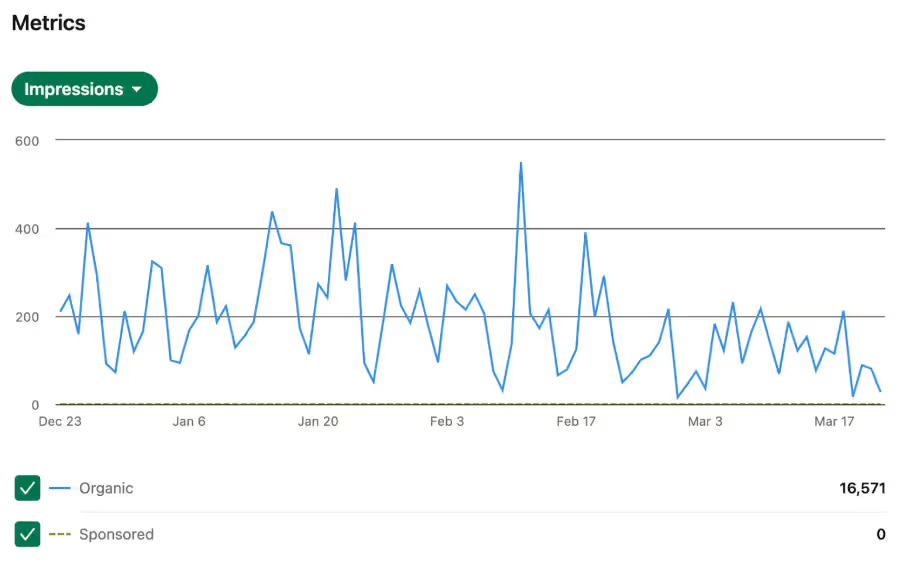
Definition of LinkedIn impressions
LinkedIn impressions = the total number of exposures to your content. One person can generate multiple impressions if your post appears to them more than once.
Think of impressions like “appearances,” not “reads.”
- If your post appears in 500 different feeds one time each → 500 impressions
- If 200 of those people see it again later → impressions rise to 700 (500 + 200)
That’s why impressions are a volume metric. They measure distribution, not unique audience size.
What counts as an impression on LinkedIn?
In general, an impression is counted every time your content visibly appears in someone’s feed.
So impressions can increase when:
- Someone scrolls and your post loads on their screen
- They refresh later and your post appears again
- Your post spreads through engagement loops and appears to more people
- Your post gets shown in different surfaces where LinkedIn displays content (feed placements are the core idea)
Important: An impression doesn’t require a click, comment, or like. It’s counted at the exposure level.
Why impressions matter on LinkedIn
Impressions are not the finish line—but they’re the start of the funnel.
No impressions = no opportunity for:
- profile visits
- follower growth
- meaningful comments
- website clicks
- inbound leads
- sales conversations
If you’re using LinkedIn for personal branding, recruiting, partnerships, or ecommerce visibility, impressions tell you whether you’re getting surfaced often enough to matter.
For example, if you’re building a brand in ecommerce and dropshipping, impressions are your first sign that your content is reaching store owners and operators who could eventually become customers of Spocket—but impressions alone won’t do it. You’ll still need the next layer: attention and action.
Impressions vs reach vs views on LinkedIn
This is where most people get stuck: the words sound similar, but the meaning is different.
Impressions vs reach (unique exposure)
- Impressions: total times your content was shown
- Reach: how many people saw it (unique viewers)
LinkedIn impressions can include the same person multiple times. Reach is closer to “unique people.”
Example: If your post has 10,000 impressions, it doesn’t mean 10,000 different people saw it. It could be 3,500 people seeing it multiple times.
Impressions vs views (deeper intent)
“Views” usually signals a stronger action than an impression—depending on format (video views, document opens, etc.). The key idea is:
- Impression = exposure
- View = higher intent consumption
If impressions are high but views are low, it often means your post appears widely but doesn’t stop the scroll.
Organic impressions vs ad impressions on LinkedIn
LinkedIn impressions can come from:
Organic impressions
These are impressions earned through the feed—based on your network, relevance signals, early engagement, and how LinkedIn distributes content.
Paid ad impressions
These are impressions generated through sponsored campaigns. For advertisers, “impression-level data” is tracked and used for reporting and measurement workflows.
Even if you’re not running ads, it’s useful to understand the difference:
- organic impressions reflect content performance
- paid impressions reflect media buying + targeting + budget delivery
How LinkedIn measures impressions (and why counts sometimes vary)
LinkedIn describes impressions as “total number of exposures,” and it notes that impressions are counted when content visibly appears in a feed.
Because impressions are exposure-based, it’s normal to see differences across:
- time windows (last 7 days vs last 28 days)
- surfaces (post analytics vs email summaries)
- updates to measurement or reporting pipelines (especially in ads contexts)
So if you ever see two different impression numbers for the “same” post in different places, it’s usually a reporting/aggregation difference—not something you did wrong.
Where to find impressions on LinkedIn
You can usually find impressions in two places:
Post-level analytics
Most posts show impressions directly in the post insights area.
Profile/company analytics
LinkedIn often aggregates impressions across your content in analytics dashboards (especially useful for tracking trend lines).
If your goal is growth, don’t just check single posts. Track weekly averages, because one outlier post can distort your perception.
What’s a good number of impressions on LinkedIn?
A “good” impression count depends on your baseline:
- follower count / connection count
- niche competitiveness
- posting consistency
- content format
- how engaging your audience is
A more useful way to judge performance is with ratios instead of raw numbers:
Metrics that matter more than impressions alone
Impressions tell you how often your content was shown — but they don’t tell you whether it worked. To understand real performance on LinkedIn, you need to look beyond exposure and focus on engagement, click-through behavior, profile visits, and conversion signals. These deeper metrics reveal whether your content is building authority or just passing through the feed unnoticed.
- Engagement rate: (reactions + comments + reposts) ÷ impressions
- Profile visit rate: profile visits ÷ impressions
- Click-through rate (CTR): clicks ÷ impressions (if you’re sharing links)
- Follow rate: new followers ÷ impressions
If impressions rise but everything else stays flat, you’re getting exposure without resonance.
Why your LinkedIn impressions are high but engagement is low
This is one of the most common frustrations on LinkedIn. Here are the usual causes:
Your hook isn’t doing its job
People see the post, but the first two lines don’t create curiosity or relevance. They scroll past, creating impressions with no engagement.
The post is too broad
Posts aimed at “everyone” usually connect with no one. LinkedIn can show it widely, but the audience won’t feel personally compelled to respond.
It’s hard to scan
Dense paragraphs kill feed performance. If your post looks like a wall of text, it can earn impressions but lose attention quickly.
The value arrives too late
If the key takeaway is buried after 12 lines, most people won’t reach it.
No clear “next step”
People might agree silently. Without a question, prompt, or opinion invitation, they won’t comment.
How to increase impressions on LinkedIn (the right way)
If impressions measure exposure, then increasing impressions means increasing the likelihood LinkedIn shows your content to more people, more often.
The biggest mistake is trying to “game” impressions. The reliable approach is to improve what LinkedIn wants to distribute: relevant content that keeps people engaged.
1. Start with a stronger opening (first 2 lines)
Your opening should do at least one of these:
- call out a specific persona (“If you’re hiring, here’s the metric you’re ignoring…”)
- name a specific pain (“Your LinkedIn posts get impressions but no leads…”)
- promise a specific payoff (“Here’s a simple framework to fix that in 5 minutes…”)
- offer a bold opinion (“Most LinkedIn advice is wrong because…”)
You’re not writing an essay intro. You’re writing a feed stopper.
2. Make posts scannable by default
Use:
- short paragraphs (1–2 sentences)
- whitespace
- punchy lines
- bullet points
- simple formatting
LinkedIn rewards content that people can consume quickly and feel rewarded by.
3. Pick 2–3 content pillars (and stick to them)
When your content is consistent, LinkedIn learns who engages with you and what topics you “belong” to. That improves distribution. Examples of content pillars:
- ecommerce growth systems
- product sourcing + supplier strategy
- marketing experiments
- founder lessons
- conversion and retention insights
If your audience is ecommerce founders, you can naturally weave in Spocket by sharing useful, real-world content like:
- supplier vetting checklists
- shipping expectation frameworks
- product-market fit testing methods
- customer service prevention strategies (refund reduction, delivery clarity)
That earns impressions from the right people—not random visibility.
4. Use conversation starters (without being cheesy)
Try prompts like:
- “What’s your experience with this?”
- “Do you agree or disagree?”
- “Which part would you change?”
- “Want the template? Comment ‘template’ and I’ll send it.”
(If you do the last one, follow through. People remember.)
5. Engage like a real person (not a growth bot)
Thoughtful comments on relevant posts can:
- increase your profile visits
- lead people to your recent posts
- create relationship loops that compound impressions
Keep comments specific:
- mention the point you agree/disagree with
- add a short example
- ask a real question
6. Build momentum through consistency
A sustainable cadence beats random bursts. A practical rhythm many creators use:
- 3–5 posts per week
- 1 deeper “mini-essay”
- 1 tactical checklist
- 1 contrarian opinion
- 1 story / lesson
Consistency matters because impressions are partly a distribution habit: LinkedIn learns how your audience reacts to you over time.
How to use impressions strategically (so they turn into results)
The real win is not “more impressions.” The win is:
More impressions from the right audience → more trust → more action
Here’s how to make impressions useful:
Step 1: Tag every post with its purpose
Before you post, decide which goal it serves:
- awareness (reach new people)
- authority (teach something valuable)
- trust (story + credibility)
- conversion (soft CTA to offer, product, or lead magnet)
If every post tries to do everything, it usually does nothing.
Step 2: Use impressions as an early signal, not a KPI trophy
Impressions tell you:
- whether the topic is getting surfaced
- whether your opening hook works
- whether your format is digestible
But impressions don’t tell you:
- if you built trust
- if you generated demand
- if you earned clicks/leads
So your tracking should look like:
- impressions (distribution)
- engagement rate (resonance)
- profile visits (curiosity)
- clicks/messages (intent)
Step 3: Run a weekly “top 3” review
Every week, identify:
- Your highest impressions post
- Your highest engagement rate post
- Your highest conversion post (most clicks/messages)
Then ask:
- What was the topic?
- What was the hook style?
- What was the format?
- Was there a clear takeaway?
- Was there a CTA?
This is how you turn LinkedIn into a repeatable engine instead of guessing.
Common LinkedIn impression myths (that hold people back)
There’s a lot of confusion around LinkedIn impressions — and that confusion often leads creators to chase the wrong goals. Many professionals assume higher impressions automatically mean better performance, when in reality, impressions are just one part of the visibility equation.
Let’s clear up the most common misconceptions so you can focus on metrics that actually drive growth.
Myth 1: “Impressions mean people read my post”
No—impressions are exposures. Your post can get thousands of impressions and still be skimmed or ignored.
Myth 2: “More impressions always means better content”
Not always. Sometimes content gets distributed broadly but to an audience that doesn’t care.
Myth 3: “The only way to increase impressions is to post every day”
Daily posting helps some people, but quality and relevance usually beat volume. Consistency matters, but quality compounds.
Myth 4: “If my impressions dropped, LinkedIn shadowbanned me”
More often, it’s:
- topic mismatch
- inconsistent posting
- weaker hooks
- format fatigue
- audience changes
A practical “impressions improvement” checklist
Before you hit “Post,” take 60 seconds to review this checklist. It’s designed to improve your LinkedIn impressions by strengthening your hook, readability, and audience alignment — the three biggest factors influencing feed distribution.
- First 2 lines include a clear pain, promise, or opinion
- Short paragraphs and easy scanning
- One main idea (not five)
- Includes a tangible takeaway (framework, steps, example)
- Ends with a conversation starter
- Fits one of your content pillars
- If linking out, you’ve still delivered value inside the post
- You can defend why your audience would care
Conclusion
LinkedIn impressions are simple in theory: they measure how often your content is exposed to members, including repeat exposure. The strategic part is what you do with that information.
Use impressions as your distribution signal, then optimize for what actually builds outcomes: better hooks, clearer value, consistent content pillars, and stronger conversation triggers.
And if you’re building in ecommerce, don’t chase random viral impressions—build targeted visibility by sharing practical insights your ideal audience cares about. That’s how impressions turn into credibility, and credibility turns into business (including interest in tools like Spocket)—without forcing it.
Start your dropshipping business today
FAQs about LinkedIn impressions
What does impressions mean on LinkedIn?
Impressions on LinkedIn refer to the total number of times your content is displayed on someone’s screen. This includes repeat exposure to the same person. If one user sees your post multiple times, each appearance counts as a separate impression. It measures visibility, not attention or engagement.
How are impressions calculated on LinkedIn?
LinkedIn generally counts an impression every time your post visibly appears in a member’s feed. It does not require a click, reaction, or comment to be counted. As long as the content is served on-screen, it contributes to the total impression count. It’s an exposure-based metric.
Are impressions the same as reach?
No, impressions and reach are different metrics. Reach refers to the number of unique individuals who saw your content. Impressions can include multiple views from the same person, which means impressions are usually higher than reach. Reach measures audience size, while impressions measure total exposure.
Do impressions mean someone interacted with my post?
No, impressions only indicate that your post was shown on someone’s screen. They do not confirm that the person read, liked, commented, or engaged with the content. Engagement metrics such as reactions, comments, and reposts are tracked separately. Impressions simply measure visibility.
What’s the difference between organic impressions and ad impressions?
Organic impressions come from LinkedIn’s natural feed distribution based on relevance and engagement. Ad impressions come from paid campaigns where content is promoted to targeted audiences. While both measure exposure, ad impressions are tied to advertising budgets and performance reporting.


Launch your dropshipping business now!
Start free trial


Related blogs
Dripshipper Reviews: Is This Coffee Dropshipping Platform Worth It?
Read this detailed Dripshipper review covering features, pros, cons, pricing, customer feedback, profitability, and better dropshipping alternatives.

Is BigBuy Legit? Honest Review for Dropshipping Businesses
Find out if BigBuy is a reliable dropshipping supplier, including its features, pros, cons, pricing concerns, reviews, and alternatives for ecommerce sellers.
What is Micromarketing and How to Use it Effectively
Learn what micromarketing is, how it works, its benefits, examples, and how ecommerce businesses can use it to target niche customers effectively.
