


Come usare il Pixel di Facebook per creare annunci più intelligenti per il tuo store di dropshipping
Learn how Meta Pixel turns store activity into clearer ad insights so you can retarget shoppers, improve campaigns, and scale dropshipping products with confidence.
.avif)

Running Facebook ads for a dropshipping store can bring traffic fast, but traffic alone does not guarantee sales. Many store owners launch ads, get clicks, and still feel unsure about what is actually happening after visitors land on their website.
That is where Facebook Pixel, now commonly known as Meta Pixel, becomes important. It helps you track what shoppers do in your store after clicking your ad. You can see whether they viewed a product, added it to cart, started checkout, or completed a purchase.
For dropshipping businesses, this data is extremely useful. Since you may be testing different products, audiences, creatives, and offers, Pixel helps you understand what is working and what needs improvement. Instead of guessing, you can use real customer behavior to build smarter ads and make better decisions.
What Is Facebook Pixel?
Facebook Pixel is a small tracking code that connects your dropshipping store with your Meta advertising account. Once installed, it collects data about visitor actions on your website and sends that information back to your ad account.
This helps Meta understand how people interact with your store. It also helps you measure ad performance more accurately. Rather than only seeing clicks and impressions, you can track actions that show real buying intent.
How Facebook Pixel Tracks Customer Actions
Facebook Pixel tracks actions through events. An event is simply something a visitor does on your store.
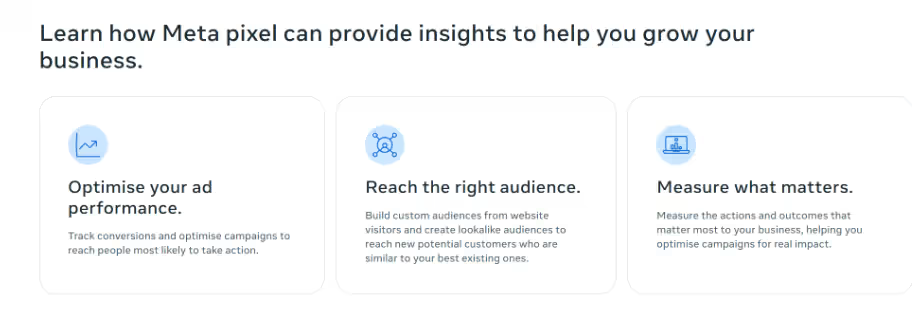
For example, when someone visits a product page, Pixel can record a product view. When they add the item to cart, it can record an add-to-cart event. When they buy, it can record a purchase.
Important ecommerce events include:
- PageView, which tracks general visits
- ViewContent, which tracks product page visits
- AddToCart, which tracks cart activity
- InitiateCheckout, which tracks checkout starts
- Purchase, which tracks completed orders
These events show how shoppers move through your funnel. This matters because every step tells you something different about customer interest.
Why Pixel Is Useful for Dropshipping Stores
Dropshipping stores often test multiple products before finding a winner. Without proper tracking, it becomes hard to know whether a product failed because of the ad, the audience, the product page, the price, or the offer.
Pixel helps you identify where the issue is. If many people click your ad but few view the product, your landing page may need work. If people view the product but do not add to cart, the offer may not be strong enough. If they start checkout but do not buy, there may be a trust or shipping concern.
This kind of insight helps you improve ads and store pages with more confidence.
Why Facebook Pixel Matters for Dropshipping Ads
Facebook ads can become expensive when campaigns are not guided by data. Dropshipping sellers usually work with product costs, shipping costs, transaction fees, and ad spend, so every decision matters.
Facebook Pixel helps you avoid wasting money on campaigns that look good on the surface but do not produce real results. It gives you a clearer picture of which ads, audiences, and products are bringing valuable visitors.
It Helps You Look Beyond Clicks
Clicks are useful, but they do not tell the full story. A campaign may get cheap clicks and still generate no sales. Another campaign may cost more per click but bring shoppers who are more likely to buy.
Pixel helps you ask better questions, such as:
- Which ad brought the most product views?
- Which audience added more items to cart?
- Which product led to checkout starts?
- Which campaign generated purchases?
- Where are shoppers leaving the funnel?
These answers are more useful than simply knowing how many people clicked.
It Helps Meta Find Better Customers
Meta’s ad system learns from the data it receives. If you optimize for clicks, it will try to find people who click. If you optimize for purchases, it will try to find people who are more likely to buy.
Facebook Pixel gives Meta the signals it needs to improve delivery. As your store collects more events, Meta can better understand what type of shoppers are valuable for your business.
This is especially helpful when testing dropshipping products. Once a product starts getting purchases, Pixel data can help Meta find more people with similar behavior.
It Makes Retargeting Possible
Most shoppers do not buy the first time they visit a store. They may compare options, check delivery times, look for reviews, or simply get distracted.
Facebook Pixel allows you to retarget people based on what they did on your store. You can show different ads to people who viewed a product, added it to cart, or started checkout but did not purchase.
For example:
- Product viewers can see benefit-focused ads.
- Cart abandoners can see reminder ads.
- Checkout abandoners can see trust-building ads.
- Past buyers can see related product ads.
This makes your ads more relevant because you are not showing the same message to everyone.
How to Set Up Facebook Pixel for Your Dropshipping Store
Setting up Facebook Pixel is usually straightforward, especially if your ecommerce platform supports direct integration. Still, it is important to understand the process so your tracking works properly from the beginning.
Before running serious ad campaigns, install and test Pixel. Even if your first campaigns are small, early tracking helps your ad account start learning from real visitor behavior.
Create Your Meta Business Account
Start by creating or logging into your Meta Business account. This is where you manage your ad account, business assets, Facebook Page, Instagram account, Pixel, and events.
Once inside, go to the Events Manager. This is where you create and manage data sources connected to your website.
From there, create a new Pixel for your dropshipping store. Meta will generate a Pixel ID, which you will use to connect your website with your ad account.
Connect Pixel to Your Store
The setup process depends on your ecommerce platform. Many platforms allow you to add your Pixel ID or connect through a built-in Meta integration.
If your store platform offers a direct integration, use it. It usually reduces setup errors and makes event tracking easier. If your platform requires manual setup, you may need to place the Pixel code in your website header and configure events separately.
Make sure the Pixel is connected to the right ad account. If it is linked incorrectly, your campaigns may not receive the right event data.
Set Up Key Ecommerce Events
Installing the base Pixel is not enough. To get useful data, you need to track ecommerce events that show buying intent.
For dropshipping stores, the most important events are:
- ViewContent
- AddToCart
- InitiateCheckout
- Purchase
These events help you understand the full customer journey. If you only track page visits, you will not know whether people are actually interested in your products.
Purchase tracking is especially important because it helps measure revenue and return on ad spend.
Test Your Pixel Before Launching Ads
After setup, test your Pixel carefully. Visit your store as if you were a customer. Open a product page, add a product to cart, start checkout, and complete a test order if possible.
Then check the Events Manager to see whether the events fired correctly.
Watch for issues such as:
- Events not firing
- Duplicate events
- Missing purchase value
- Wrong currency
- Pixel missing from key pages
- Add-to-cart events firing incorrectly
Clean tracking is important because poor data can lead to poor ad decisions.
How to Use Facebook Pixel Data to Improve Your Ads
Once your Pixel is collecting data, you can start using it to make your ads smarter. The goal is not just to collect numbers. The goal is to understand customer behavior and improve your campaigns based on that behavior.
For dropshipping, Pixel data can help you test products, compare audiences, adjust offers, and retarget shoppers who showed interest but did not buy.
Build Retargeting Campaigns for Product Viewers
Product viewers are people who visited a product page but did not add the item to cart. They have shown interest, but they may need more information before buying.
For this group, your retargeting ads should focus on product benefits, use cases, and problem-solving. Avoid pushing too aggressively right away. Instead, remind them why the product is useful.
Good retargeting angles include:
- Showing the product in use
- Highlighting the main benefit
- Answering common questions
- Showing lifestyle-based visuals
- Explaining how the product solves a problem
For example, if you sell a home organization product, your retargeting ad can show how it saves space or makes a room look cleaner. If you sell a beauty accessory, the ad can highlight convenience or visible results.
Retarget Add-to-Cart Visitors With Stronger Messages
Add-to-cart visitors are warmer than product viewers. They liked the product enough to take action but stopped before buying.
For this audience, your ads can be more direct. You can remind them about the item, show social proof, offer reassurance, or address common concerns.
Useful messages include:
- “Your cart is waiting.”
- “Still thinking it over?”
- “Complete your order today.”
- “Get it before it sells out.”
- “Here’s why customers love it.”
However, do not rely only on discounts. Sometimes shoppers abandon carts because of unclear shipping timelines, lack of reviews, or weak trust signals. Your ads can also highlight secure checkout, return policies, and delivery expectations.
Create Lookalike Audiences From Buyers
Once your store has enough purchase data, you can create lookalike audiences. These audiences include people who share similar traits and behaviors with your existing customers.
For dropshipping sellers, lookalike audiences can help scale winning products. Instead of only testing interests manually, you can allow Meta to find people similar to your buyers.
The strongest source audience is usually purchasers. If you do not have enough purchases yet, you can test lookalikes based on add-to-cart visitors, checkout initiators, or high-quality website visitors.
Still, purchase-based data is more valuable because it is built from people who completed the action that matters most.
Optimize Campaigns for the Right Event
When setting up campaigns, choose the event you want Meta to optimize for. This choice affects who your ads are shown to.
If you optimize for traffic, Meta will look for people likely to click. If you optimize for AddToCart, it will look for people likely to add items to cart. If you optimize for Purchase, it will look for people more likely to buy.
For a new store with limited data, you may start with ViewContent or AddToCart. As more data comes in, shift toward Purchase optimization.
The long-term goal should be purchase optimization because sales matter more than clicks.
Use Pixel Data to Compare Product Tests
Product testing is central to dropshipping. You may test several products before finding one that performs well.
Pixel data helps you compare products more accurately. A product with many clicks but no carts may not have strong buying intent. A product with fewer clicks but more add-to-carts may have better potential.
When reviewing product tests, look at the full funnel:
- Are people clicking the ad?
- Are they viewing the product?
- Are they adding to cart?
- Are they starting checkout?
- Are they completing the purchase?
This helps you avoid scaling products based only on cheap clicks.
Important Facebook Pixel Metrics to Track
Facebook Pixel gives you access to many metrics, but some are more useful than others for dropshipping. Focus on the numbers that reveal buyer intent, funnel strength, and profitability.
These metrics help you understand whether the problem is with the ad, product page, pricing, offer, or checkout experience.
1. ViewContent Rate
ViewContent shows how many visitors reached a product page. If your ad gets clicks but product views are low, your landing experience may need improvement.
Possible issues include:
- Slow page speed
- Broken links
- Poor mobile experience
- Incorrect campaign URL
- Visitors leaving before the page loads
Since many Facebook and Instagram users browse on mobile, your product page should load quickly and look clean on smaller screens.
2. Add-to-Cart Rate
Add-to-cart rate shows whether shoppers are interested enough to consider buying. If product views are high but add-to-cart actions are low, your product page may need work.
Common reasons include:
- Weak images
- Unclear benefits
- High price compared to perceived value
- Poor product description
- Lack of reviews
- Confusing shipping or variant details
This metric helps you understand whether your product page is convincing visitors to take the next step.
3. Checkout Initiation Rate
InitiateCheckout shows how many shoppers start checkout after adding a product to cart. If cart activity is strong but checkout starts are low, your cart page may be creating friction.
Check whether the cart page clearly displays product details, price, shipping information, and the checkout button. Avoid unnecessary distractions.
For dropshipping stores, delivery clarity is especially important. If shoppers are unsure when they will receive the product, they may leave before checkout.
4. Purchase Conversion Rate
Purchase conversion rate shows how many visitors complete an order. This is one of the most important metrics because it connects ad traffic with actual revenue.
A low purchase rate may be caused by:
- Unexpected shipping fees
- Long delivery timelines
- Lack of payment options
- Weak trust signals
- Poor checkout design
- Missing return policy
Improving conversion rate can make your ads more profitable without increasing your budget.
5. Return on Ad Spend
Return on ad spend, or ROAS, shows how much revenue your ads generate compared to what you spend.
However, dropshipping sellers should not look at ROAS alone. Revenue is not the same as profit. You also need to consider product cost, shipping cost, payment fees, app costs, and refunds.
Pixel helps track revenue, but you should compare ad performance with actual profit margins.
Best Practices for Using Facebook Pixel
Facebook Pixel works best when it is part of a larger advertising strategy. Installing it is only the beginning. To get better results, you need to review your data and make regular improvements.
The goal is to make every campaign teach you something useful. Even campaigns that do not produce sales can still reveal important customer behavior.
Start With Clear Campaign Goals
Before launching ads, decide what you want to learn. Are you testing product demand, creative angles, audiences, or checkout performance?
Clear goals make Pixel data easier to understand.
For example, if your goal is product validation, focus on product views and add-to-carts. If your goal is scaling, focus more on purchases and return on ad spend.
Keep Your Ad Structure Simple
New dropshipping sellers often create too many campaigns, audiences, and ad sets too early. This makes results harder to read.
Start simple. Test a few products, creatives, and audiences. Let Pixel collect enough signals before making major changes.
A simple structure is easier to analyze and improve.
Refresh Retargeting Ads Regularly
Retargeting is useful, but showing the same ad too often can reduce performance. If people keep seeing the same message, they may ignore it.
Refresh your retargeting creatives when frequency rises or results drop. You can test new hooks, product videos, customer benefits, or trust-building messages.
Good retargeting should feel helpful, not repetitive.
Review Pixel Data Consistently
Do not check Pixel data only when campaigns fail. Review it regularly to understand patterns.
Look at which products get views, which ones get cart activity, where customers drop off, and which campaigns produce profitable purchases.
This habit helps you make better decisions over time.
Conclusion
Facebook Pixel is one of the most useful tools for building smarter dropshipping ads. It helps you understand what shoppers do after clicking your ad, which products attract real interest, and where customers leave before buying.
When used properly, Pixel can improve product testing, retargeting, audience building, campaign optimization, and funnel performance. It helps you stop judging ads only by clicks and start focusing on actions that lead to revenue.
For the best results, combine accurate tracking with reliable products and suppliers. With Spocket, sellers can source quality products from vetted suppliers and create a stronger foundation before sending paid traffic. When product quality, clear messaging, and Pixel data work together, your ads become easier to improve and scale.
Start your dropshipping business today
FAQs about Facebook Pixel for Dropshipping
Do I need Facebook Pixel for my dropshipping store?
Yes, if you plan to run Facebook or Instagram ads. Facebook Pixel helps you track what visitors do after clicking your ad, including product views, cart actions, checkout starts, and purchases.
Is Facebook Pixel free?
Yes, Facebook Pixel is free to create and install. You only pay for the ads you run. The real value comes from using Pixel data to improve campaigns and retarget interested shoppers.
Quali eventi dovrebbero monitorare gli store di dropshipping?
Gli store di dropshipping dovrebbero monitorare PageView, ViewContent, AddToCart, InitiateCheckout e Purchase. Questi eventi mostrano come i clienti si muovono all'interno del tuo funnel di vendita.
Il Pixel di Facebook può aiutare a ridurre gli sprechi di budget pubblicitario?
Sì, il Pixel di Facebook può aiutarti a identificare campagne deboli, fare retargeting su visitatori interessati e scalare i prodotti con dati più solidi. Non garantisce costi inferiori, ma ti aiuta a prendere decisioni migliori per le tue inserzioni.
Posso pubblicare annunci su Facebook senza il Pixel?
Puoi, ma non è consigliato per il dropshipping. Senza il Pixel, potresti vedere solo clic e impressioni. Non saprai cosa fanno gli acquirenti dopo essere atterrati sul tuo store.


Launch your dropshipping business now!
Start free trial


Blog correlati
Elenco fornitori dropshipping: dove trovare fornitori verificati
Esplora la nostra directory di fornitori dropshipping verificati negli Stati Uniti e nell'Unione Europea, completa di nicchie, tempi di spedizione e prezzi. Inizia oggi la tua prova gratuita.

Come negoziare con i fornitori dropshipping: 9 tattiche che funzionano davvero
Scopri come negoziare con i fornitori dropshipping prezzi, MOQ e termini di pagamento. Strategie comprovate e modelli di email per aumentare i tuoi margini. Prova Spocket gratuitamente.

Best Clothing Dropshipping Suppliers: The 2026 Guide
Compare the best clothing dropshipping suppliers for 2026 — US/EU shipping speeds, pricing, and product quality — and find the right fit to launch your store.
